---
title: "美酒评鉴Agent系统:基于酒评家RAG"
author: "Tony D"
date: "2025-11-05"
categories: [AI, API, tutorial]
image: "images/0.png"
format:
html:
code-fold: true
code-tools: true
code-copy: true
execute:
eval: false
warning: false
---
# 项目概览
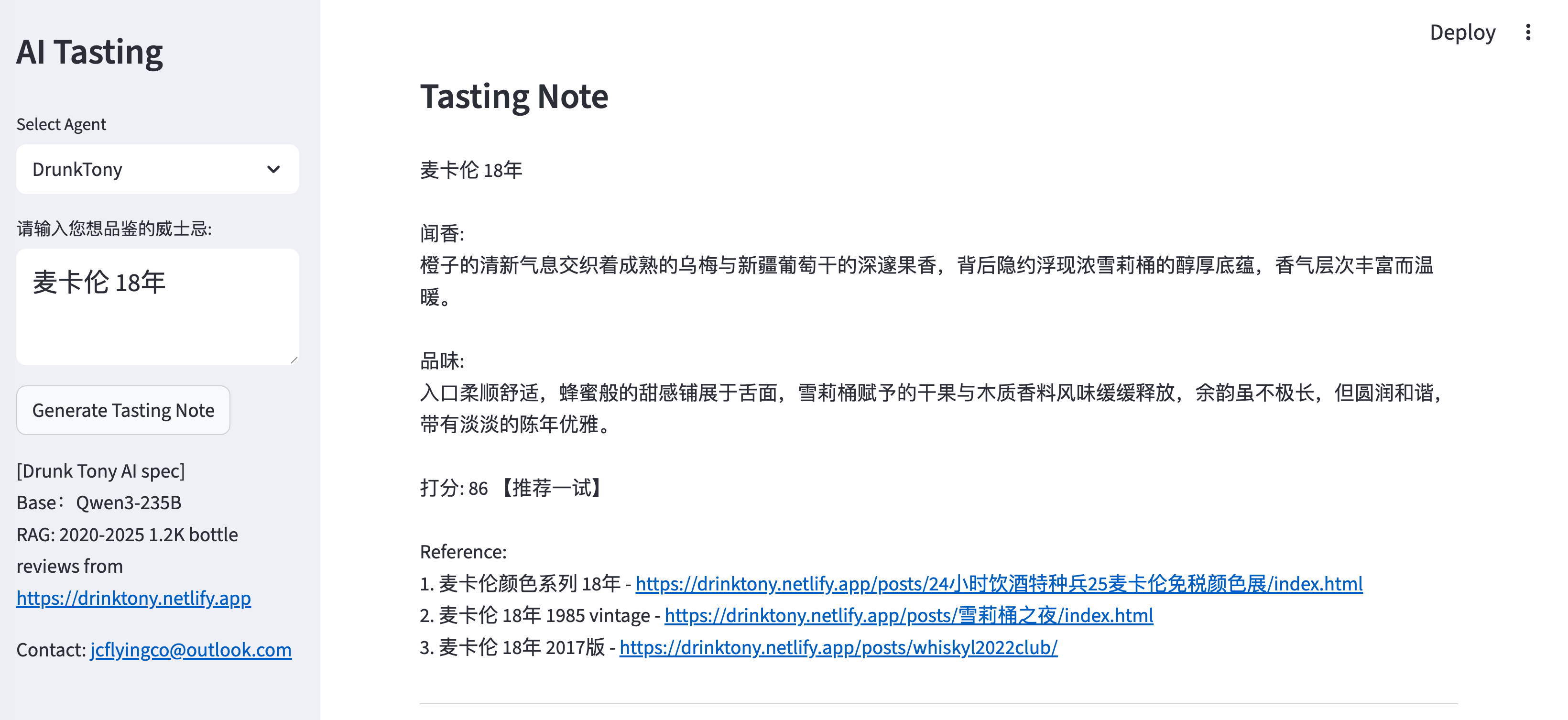
威士忌品鉴应用是一款先进的 AI 驱动 Web 应用程序,可生成详细、专业的威士忌品鉴笔记和建议。该系统的特别之处在于其采用了多 Agent 架构,并配备了专门的 AI 人格,每个人格都经过了不同威士忌评论源和语言风格的训练。
在线演示 (Modelscope): [https://modelscope.cn/studios/ttflying/whisky_AI_tasting](https://modelscope.cn/studios/ttflying/whisky_AI_tasting)
在线演示 (Shinyapp): [https://jcflyingco.shinyapps.io/ai-whisky-tasting/](https://jcflyingco.shinyapps.io/ai-whisky-tasting)
Github: [https://github.com/JCwinning/whisky_tasting](https://github.com/JCwinning/whisky_tasting)
::: {.panel-tabset}
## AI 品鉴词
{width="100%"}
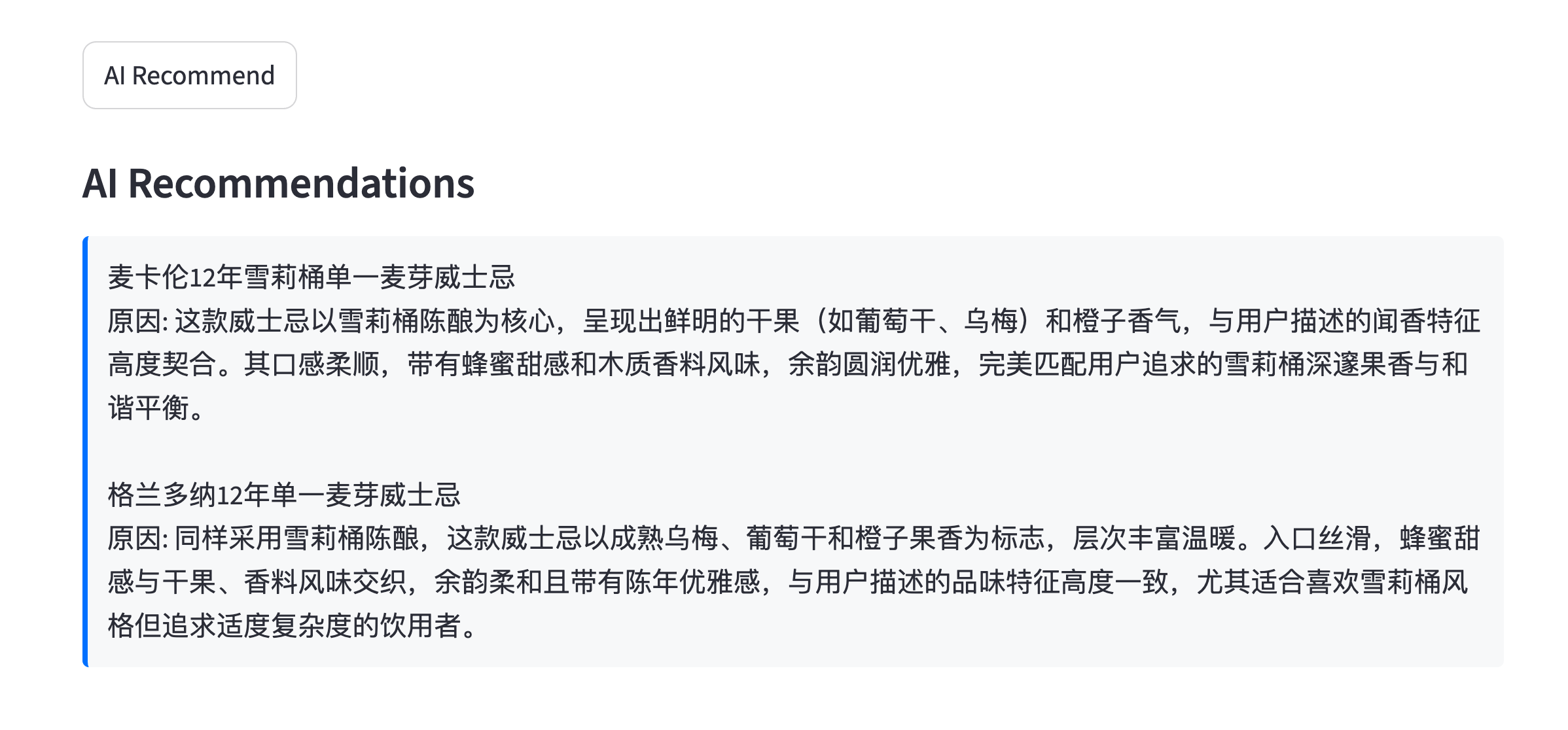
## AI 推荐
{width="100%"}
:::
## 核心架构
### 多 Agent AI 系统
该应用包含三个专门的 AI Agent,每个 Agent 都有独特的特征和数据源:
1. **DrunkTony (dt)** - 中文 Agent,专注于中文威士忌评论。
2. **WhiskyFunny (wf)** - 英文 Agent,数据源自 whiskyfun.com。
3. **WhiskyNotebook (wn)** - 英文 Agent,数据源自 whiskynotes.be。
### 技术栈
- **主要语言**: Python 3.13+
- **Web 框架**: Streamlit (主选) + Shiny for Python (备选)
- **数据库**: DuckDB (376MB,针对向量操作进行了优化)
- **AI/ML**: OpenAI API, 向量嵌入 (Vector embeddings), RAG 系统
- **数据源**: 使用 BeautifulSoup4 进行网页抓取
## 数据库架构
### 数据模式与来源
系统使用 DuckDB 作为主数据库,因其在向量操作方面表现卓越:
```sql
-- 数据库结构
CREATE TABLE drinktony_embed (
    full TEXT,
    bottle_embedding FLOAT[1024]  -- 1024 维向量
);

CREATE TABLE whiskyfun_embed (
    full TEXT,
    bottle_embedding FLOAT[1024]
);

CREATE TABLE whiskynote_embed (
    full TEXT,
    bottle_embedding FLOAT[1024]
);
```
### 数据采集流程
```{python}
# get_data_dt.py 中的网页抓取示例
def scrape_drinktony_reviews():
    """从 drinktony.netlify.app 抓取中文威士忌评论"""
    url = "https://drinktony.netlify.app/"
    response = requests.get(url)
    soup = BeautifulSoup(response.content, "html.parser")

    # 查找所有评论链接
    post_links = [urljoin(url, a.get("href"))
                 for a in soup.select("a.quarto-grid-link")]

    all_reviews = []
    for post_url in post_links:
        response = requests.get(post_url)
        soup = BeautifulSoup(response.content, "html.parser")

        # 提取评论章节
        review_sections = soup.select("section.level1")
        for section in review_sections:
            # 解析威士忌名称和评论内容
            whisky_name = extract_whisky_name(section)
            review_text = extract_review_text(section)
            all_reviews.append({
                'whisky': whisky_name,
                'review': review_text
            })

    return all_reviews
```
## AI/ML 实现
### 向量嵌入技术
应用使用尖端的嵌入技术将文本转换为高维向量,以便进行语义相似度搜索。
#### 嵌入模型详情
**模型**: BAAI/bge-large-zh-v1.5
- **维度**: 1024
- **服务商**: SiliconFlow API
- **用途**: 跨语言文本理解(在中英文方面表现均很出色)
#### 为什么选择 BGE-Large-ZH?
1. **跨语言能力**: 在理解中英文威士忌专业术语方面表现优异。
2. **高性能**: 与通用嵌入模型相比,具备更出色的语义理解能力。
3. **高效尺寸**: 1024 维度在性能和存储效率之间达到了平衡。
4. **API 访问**: 通过 SiliconFlow 提供稳定的服务。
#### 嵌入流程
该应用使用 BGE-Large-ZH-v1.5 模型生成嵌入向量:
```{python}
def get_embedding(text: str, api_key: str):
    """使用 SiliconFlow API 生成文本嵌入"""
    client = OpenAI(
        api_key=api_key,
        base_url="https://api.siliconflow.cn/v1"
    )
    response = client.embeddings.create(
        model="BAAI/bge-large-zh-v1.5",
        input=[text]
    )
    return np.array(response.data[0].embedding)

def cosine_similarity(v1, v2):
    """计算两个向量之间的余弦相似度"""
    if v1 is None or v2 is None:
        return 0
    return np.dot(v1, v2) / (np.linalg.norm(v1) * np.linalg.norm(v2))
```
### RAG 系统架构
检索增强生成 (RAG) 系统是此应用的核心创新。让我们详细探讨其组件。
### RAG 工作流
检索增强生成过程遵循以下步骤:
```mermaid
%%| fig-cap: "威士忌品鉴的 RAG 工作流"
flowchart TD
    A[用户输入<br/>威士忌名称] --> B[生成嵌入向量]
    B --> C[DuckDB 中的<br/>向量相似度搜索]
    C --> D[检索前 10 条<br/>相似评论]
    D --> E[为 LLM 格式化上下文]
    E --> F[主 LLM<br/>生成品鉴笔记]
    F --> G[副 LLM<br/>生成推荐建议]
    G --> H[格式化并<br/>显示结果]

    C --> I[数据库]
    I --> J[drinktony_embed<br/>1200 条中文评论]
    I --> K[whiskyfun_embed<br/>2 万条英文评论]
    I --> L[whiskynote_embed<br/>5000 条英文评论]
```
### 相似度搜索实现
```{python}
def find_similar_chunks(
    query_embedding,
    db_path,
    table_name,
    text_col,
    embedding_col,
    top_n=10,
):
    """使用余弦相似度在数据库中查找最相似的文本块"""
    try:
        with duckdb.connect(database=db_path, read_only=True) as con:
            df = con.execute(
                f'SELECT "{text_col}", "{embedding_col}" FROM "{table_name}"'
            ).fetchdf()

            # 计算相似度
            similarities = []
            for _, row in df.iterrows():
                text = row[text_col]
                embedding = np.array(row[embedding_col])
                similarity = cosine_similarity(query_embedding, embedding)
                similarities.append((text, similarity))

            # 按相似度排序并返回前 N 条
            similarities.sort(key=lambda x: x[1], reverse=True)
            return similarities[:top_n]

    except Exception as e:
        print(f"搜索相似块时出错: {e}")
        return []
```
## 专门 Agent 的实现
### DrunkTony (中文 Agent)
```{python}
def run_conversation(query, api_key, model):
    """生成中文格式的威士忌品鉴笔记"""

    # 第 1 步:生成嵌入并查找相似评论
    query_embedding = get_embedding(query, api_key)
    similar_reviews = find_similar_chunks(
        query_embedding=query_embedding,
        db_path="data/whisky_database.duckdb",
        table_name="drinktony_embed",
        text_col="full",
        embedding_col="bottle_embedding"
    )

    # 第 2 步:为 LLM 准备上下文
    context = "\n---\n".join([review[0] for review in similar_reviews])

    # 第 3 步:生成品鉴笔记
    prompt = f"""作为威士忌专家,基于以下威士忌品鉴笔记,为"{query}"生成专业的品鉴报告:

参考品鉴笔记:
{context}

请按以下格式输出:
{query}
闻香: [详细描述]
品味: [详细描述]
打分: [90-100分]
"""

    response = llm_client.chat.completions.create(
        model=model,
        messages=[
            {"role": "system", "content": "你是一位专业的威士忌品鉴师,擅长生成详细准确的品鉴笔记。"},
            {"role": "user", "content": prompt}
        ],
        temperature=0.7,
        max_tokens=1000
    )

    return response.choices[0].message.content
```
### WhiskyFunny (英文 Agent)
```{python}
def run_conversation(query, api_key, model):
    """生成英文格式的威士忌品鉴笔记"""

    query_embedding = get_embedding(query, api_key)
    similar_reviews = find_similar_chunks(
        query_embedding=query_embedding,
        db_path="data/whisky_database.duckdb",
        table_name="whiskyfun_embed",
        text_col="full",
        embedding_col="bottle_embedding"
    )

    context = "\n---\n".join([review[0] for review in similar_reviews])

    prompt = f"""As a whisky expert, generate professional tasting notes for "{query}" based on these reference reviews:

Reference reviews:
{context}

Please output in this format:
Colour: [detailed description]
Nose: [detailed aroma description]
Mouth: [detailed taste description]
Finish: [detailed finish description]
Comments: [overall impression]
SGP: xxx - xx points
"""

    response = llm_client.chat.completions.create(
        model=model,
        messages=[
            {"role": "system", "content": "You are a professional whisky taster specializing in detailed sensory analysis."},
            {"role": "user", "content": prompt}
        ],
        temperature=0.7,
        max_tokens=1200
    )

    return response.choices[0].message.content
```
## 推荐引擎
### 双 LLM 推荐系统
应用使用一个独立的 LLM 来生成威士忌推荐建议:
```{python}
def recommend_whiskies_by_profile(tasting_notes, api_key, model):
    """基于品鉴特征生成威士忌推荐"""

    prompt = f"""Based on these tasting notes, recommend 2 similar whiskies that the user might enjoy:

{Tasting Notes:}
{tasting_notes}

Please provide:
1. Whisky name with brief description
2. Why it matches the user's preference
3. Price range and availability

Format each recommendation as:
**Recommendation [1/2]:** [Whisky Name]
**Why it matches:** [detailed reasoning]
**Details:** [price, availability, tasting profile]
"""

    response = recommendation_client.chat.completions.create(
        model=model,  # 推荐使用不同的模型
        messages=[
            {"role": "system", "content": "You are a whisky recommendation expert with deep knowledge of global whisky brands and profiles."},
            {"role": "user", "content": prompt}
        ],
        temperature=0.8,
        max_tokens=800
    )

    return response.choices[0].message.content
```
## 用户界面设计
### Streamlit 实现
```{python}
# 主应用程序界面
def main():
    st.set_page_config(
        page_title="AI 威士忌品鉴系统",
        page_icon="🥃",
        layout="wide"
    )

    # 侧边栏 Agent 选择
    with st.sidebar:
        st.header("🥃 威士忌 AI 品鉴")

        # Agent 选择
        agent_type = st.selectbox(
            "选择品鉴 Agent:",
            ["DrunkTony (中文)", "WhiskyFunny (English)", "WhiskyNotebook (English)"],
            help="每个 Agent 都有不同的性格和数据源"
        )

        # 模型选择
        model_options = get_model_options(agent_type)
        selected_model = st.selectbox("模型:", model_options)

    # 主内容区域
    st.header("专业的威士忌品鉴笔记生成器")

    # 输入部分
    col1, col2 = st.columns([2, 1])
    with col1:
        whisky_name = st.text_input(
            "输入威士忌名称:",
            placeholder="例如: Macallan 18 Year Old",
            help="输入完整的威士忌名称,包括年份和桶型"
        )

    with col2:
        st.write("")  # 间距
        generate_btn = st.button("🍷 生成品鉴笔记", type="primary")
        recommend_btn = st.button("🎯 获取推荐")

    # 输出部分
    if generate_btn:
        if not whisky_name:
            st.error("请输入威士忌名称")
        else:
            with st.spinner("正在分析威士忌..."):
                tasting_notes = generate_tasting_notes(whisky_name, agent_type, selected_model)
                st.markdown("### 🥃 品鉴笔记")
                st.markdown(tasting_notes)

    if recommend_btn:
        with st.spinner("正在查找推荐..."):
            recommendations = get_recommendations(tasting_notes, agent_type)
            st.markdown("### 🎯 个性化推荐")
            st.markdown(recommendations)
```
## 频率限制与成本管理
### API 使用控制
```{python}
# 频率限制实现
RATE_LIMIT_FILE = "rate_limit.json"
MAX_RUNS_PER_DAY = 80

def get_rate_limit_data():
    """获取当前使用数据"""
    try:
        with open(RATE_LIMIT_FILE, "r") as f:
            data = json.load(f)
            # 确保键存在
            if "date" not in data or "count" not in data:
                return {"date": str(datetime.date.today()), "count": 0}
            return data
    except (FileNotFoundError, json.JSONDecodeError):
        return {"date": str(datetime.date.today()), "count": 0}

def check_rate_limit():
    """检查用户是否超出了每日限制"""
    data = get_rate_limit_data()
    today = str(datetime.date.today())

    if data["date"] != today:
        # 为新的一天重置计数器
        return {"date": today, "count": 0, "can_run": True}

    if data["count"] >= MAX_RUNS_PER_DAY:
        return {"date": today, "count": data["count"], "can_run": False}

    return {"date": today, "count": data["count"], "can_run": True}
```
## 性能优化
### 向量数据库性能
```{python}
# 针对大数据的分批优化相似度搜索
def batch_similarity_search(query_embedding, db_path, table_name, batch_size=1000):
    """针对大型数据集的分批相似度搜索优化"""

    with duckdb.connect(database=db_path, read_only=True) as con:
        # 获取总行数
        total_rows = con.execute(f"SELECT COUNT(*) FROM {table_name}").fetchone()[0]

        all_similarities = []

        # 分批处理以管理内存
        for offset in range(0, total_rows, batch_size):
            batch_df = con.execute(
                f'SELECT full, bottle_embedding FROM {table_name} LIMIT {batch_size} OFFSET {offset}'
            ).fetchdf()

            # 计算该批次的相似度
            for _, row in batch_df.iterrows():
                embedding = np.array(row['bottle_embedding'])
                similarity = cosine_similarity(query_embedding, embedding)
                all_similarities.append((row['full'], similarity))

        # 排序并返回前几条结果
        all_similarities.sort(key=lambda x: x[1], reverse=True)
        return all_similarities[:10]
```
## 部署与配置
### 环境搭建
```bash
# .env 文件中的环境变量
SILICONFLOW_API_KEY=您的 SiliconFlow 密钥
MODELSCOPE_API_KEY=您的 ModelScope 密钥
GEMINI_API_KEY=您的 Gemini 密钥  # 可选

# 数据库初始化
python -c "
import duckdb
conn = duckdb.connect('data/whisky_database.duckdb')
# 创建支持向量的表格
"
```
### Shiny for Python 备选方案
```{python}
# 使用 Shiny 实现的备选 UI
from shiny import App, ui, render, reactive, req

app_ui = ui.page_fluid(
    ui.h2("🥃 AI 威士忌品鉴系统"),
    ui.layout_sidebar(
        ui.sidebar(
            ui.input_select("agent", "选择 Agent:", [
                "DrunkTony (中文)", "WhiskyFunny (English)", "WhiskyNotebook (English)"
            ]),
            ui.input_text("whisky_name", "威士忌名称:", ""),
            ui.input_action_button("generate", "生成品鉴笔记")
        ),
        ui.output_text_verbatim("tasting_notes"),
        ui.output_text_verbatim("recommendations")
    )
)

def server(input, output, session):
    @output
    @render.text
    def tasting_notes():
        req(input.generate())
        # 生成品鉴笔记逻辑
        return generate_tasting_notes(input.whisky_name(), input.agent())

app = App(app_ui, server)
```
## 技术成就
### 核心创新
1. **多 Agent 架构**: 拥有不同的 AI 人格和数据源。
2. **RAG 实现**: 使用真实威士忌评论进行检索增强生成。
3. **向量数据库**: 使用 376MB 数据库进行高效相似度搜索。
4. **双语支持**: 提供中文和英文 Agent。
5. **成本管理**: 内置频率限制和 API 优化。
6. **专业品鉴格式**: 符合行业标准的笔记结构。
### 性能指标
| 指标 | 数值 |
|--------|-------|
| 数据库大小 | 376MB (26,000+ 条评论) |
| 嵌入维度 | 1024 |
| 搜索延迟 | < 2 秒 |
| 每日请求限制 | 80 次请求 |
| 支持语言 | 2 (EN/ZH) |
| 数据源 | 3 (drinktony, whiskyfun, whiskynotes) |
## 未来增强方向
下一版本的潜在改进点:
1. **高级相似度算法**: 实现文本 + 元数据的混合搜索。
2. **用户个性化**: 随着时间推移学习用户的偏好。
3. **移动端应用**: 原生的 iOS/Android 应用程序。
4. **实时数据更新**: 自动化的网页抓取流水线。
5. **口味特征分析**: 根据用户偏好生成其口味特征图谱。
6. **社交功能**: 与社区分享品鉴笔记和推荐。
## 结论
这款威士忌品鉴应用展示了将 RAG 技术与专门的 AI Agent 相结合,从而构建复杂的领域特定系统的强大力量。本项目展示了:
- **先进的 AI 架构**: 具备不同人格的多 Agent 系统。
- **数据工程**: 大规模向量数据库管理。
- **专业知识**: 行业标准的品鉴笔记格式。
- **用户体验**: 跨平台的简洁、直观界面。
- **成本效益**: 智能的频率限制和优化。
无论您是威士忌爱好者、AI 开发人员还是数据科学家,本项目都为您提供了一个极佳的范例,展示了如何结合真实世界数据与先进机器学习技术来构建生产级 AI 应用。
---
**技术栈**: Python, Streamlit, DuckDB, OpenAI API, 向量嵌入 (Vector Embeddings)
**数据库**: 涵盖 3 个专门来源的 26,000+ 条真实威士忌评论。

