结合 AI 分析的 Shiny 和 Streamlit 体重追踪看板
AI
API
tutorial
项目概览
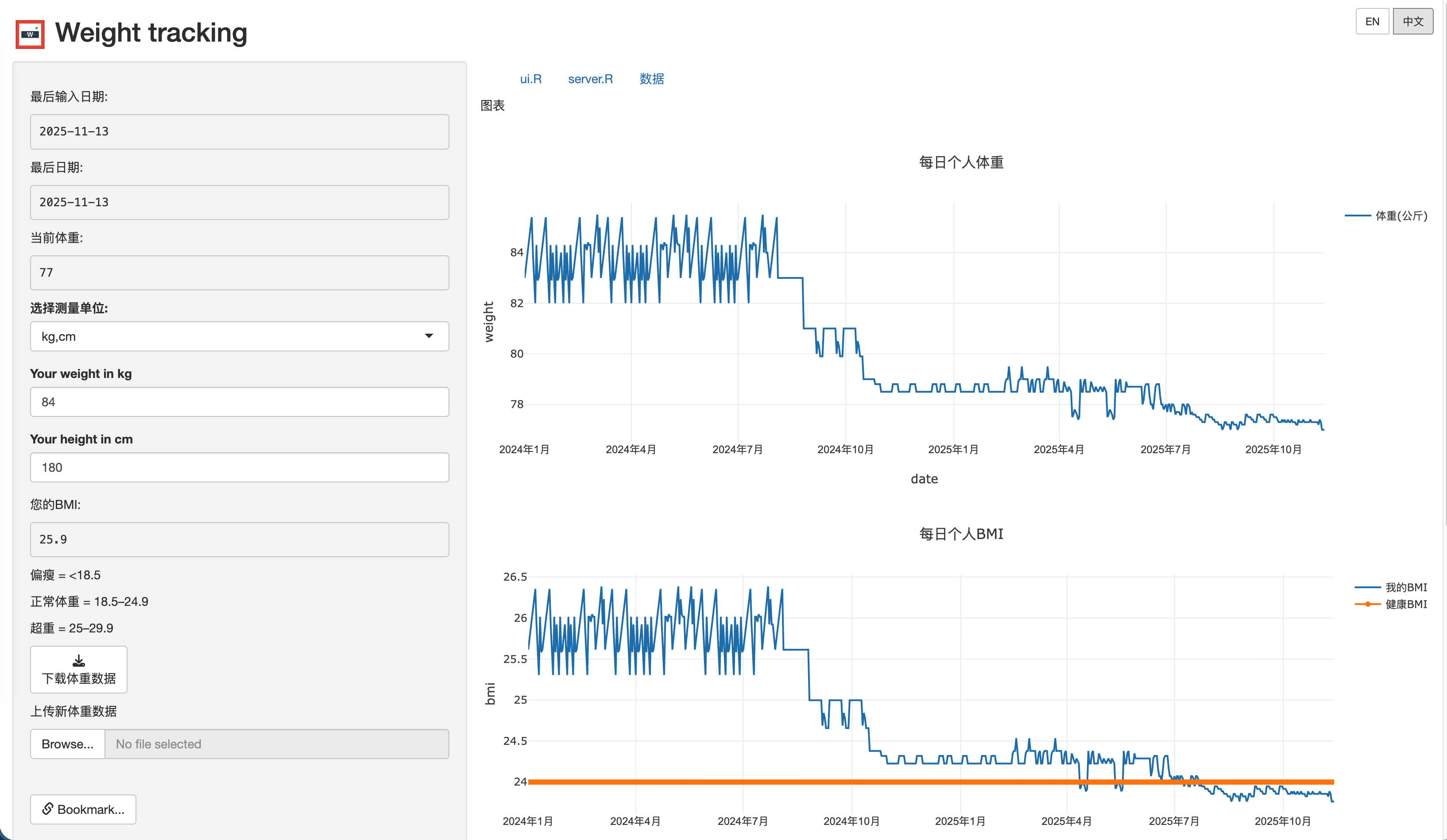
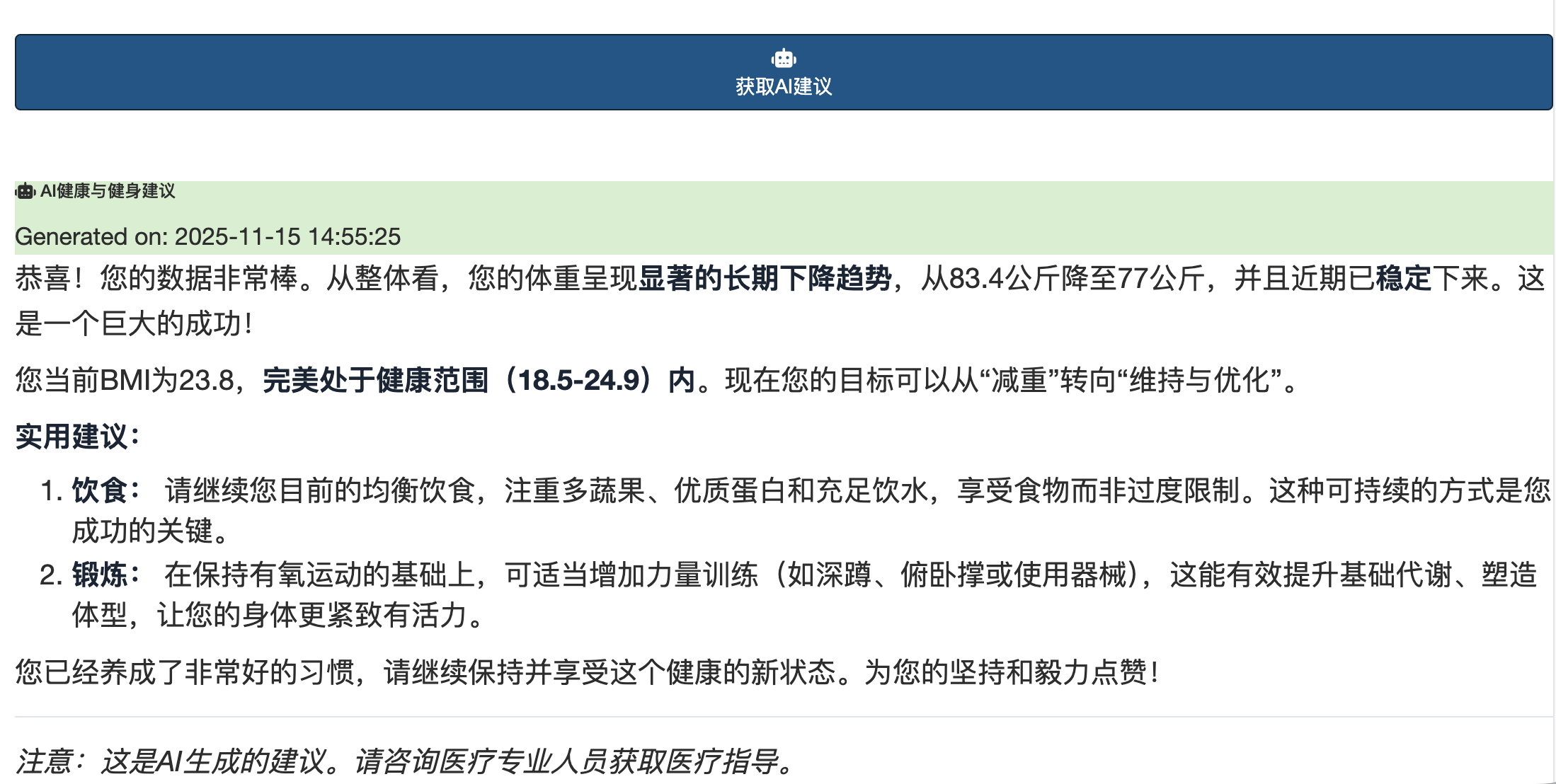
体重追踪应用是一款全面的 R Shiny Web 应用程序,可帮助用户监测体重趋势、计算 BMI,并获得基于 AI 的个性化健康建议。本项目的一个特别之处在于它集成了多个 AI 服务商,并具备实时数据同步功能。
在线演示: https://jcflyingco.shinyapps.io/weight_tracking/
Github: https://github.com/JCwinning/weight_tracking
核心功能
健康监测能力
- 体重追踪:交互式的体重记录和随时间变化的可视化。
- BMI 计算器:自动计算 BMI 并与健康范围进行对比。
- 单位转换:在公制(kg/cm)和英制(磅/英寸)之间无缝切换。
- 实时更新:当修改 Excel 文件时,数据会自动刷新。
高级技术特性
- 多服务商 AI 集成:支持 Modelscope、OpenRouter、Gemini 和 OpenAI 兼容的 API。
- 完善的国际化:完整的英文/中文双语支持,包含 50+ 个翻译字段。
- 实时文件监控:当数据文件发生变化时,UI 会自动更新。
- 交互式可视化:具备缩放、平移和悬停功能的 Plotly 图表。
- 数据管理:支持 Excel 导入/导出,并具备响应式数据更新。
技术架构
技术栈
- 主要框架:R Shiny(经典架构)
- UI 组件:基于 Bootstrap 的响应式设计,使用
bslib - 数据处理:
tidyverse,readxl,openxlsx - 可视化:使用
plotly实现交互式图表 - AI 集成:使用
ellmer支持多服务商 AI
文件结构分析
weight_tracking/
├── ui.R              # 包含控件的多标签界面
├── server.R          # 服务器逻辑和数据管理
├── global.R          # URL 书签配置
├── ai_config.R       # 统一的 AI 服务商管理
├── language.R        # 完整的国际化系统
├── weight.xlsx       # 主要数据存储
├── www/logo.png      # 应用品牌标识
└── images/           # 应用截图
数据管理系统
该应用实现了一套精致的数据处理流程,确保了实时同步和高效的数据处理。
数据处理工作流
实时文件监控
应用使用 reactivePoll() 来监控 Excel 数据文件的更改:
Code
# 实时数据监控,间隔为 1000ms
weight_data <- reactivePoll(
  intervalMillis = 1000,
  session = session,
  checkFunc = function() {
    # 检查文件修改时间
    if (file.exists("weight.xlsx")) {
      file.info("weight.xlsx")$mtime
    } else {
      0
    }
  },
  valueFunc = function() {
    # 读取并处理 Excel 文件
    if (file.exists("weight.xlsx")) {
      data <- read_excel("weight.xlsx") %>%
        mutate(
          Date = anytime(Date),
          BMI = case_when(
            Unit == "kg" ~ Weight / (Height/100)^2,
            Unit == "pound" ~ (Weight * 0.453592) / ((Height * 2.54)/100)^2
          )
        )
      return(data)
    }
    return(data.frame())
  }
)
BMI 计算算法
应用实现了包含单位转换的全面 BMI 计算:
BMI 类别和健康范围
| BMI 范围 | 类别 | 健康风险 | 颜色代码 |
|---|---|---|---|
| < 18.5 | 体重过轻 | 中度风险 | 黄色 |
| 18.5 - 24.9 | 体重正常 | 风险最小 | 绿色 |
| 25.0 - 29.9 | 超重 | 风险增加 | 橙色 |
| ≥ 30.0 | 肥胖 | 高风险 | 红色 |
单位转换示例
Code
# 公制和英制单位的 BMI 计算
calculate_bmi <- function(weight, height, unit) {
  if (unit == "kg") {
    # 公制计算
    bmi <- weight / ((height/100)^2)
  } else {
    # 英制计算并转换
    weight_kg <- weight * 0.453592  # 磅转换为千克
    height_m <- height * 2.54 / 100  # 英寸转换为米
    bmi <- weight_kg / (height_m^2)
  }

  # BMI 分类
  category <- case_when(
    bmi < 18.5 ~ "underweight",
    bmi < 25 ~ "normal",
    bmi < 30 ~ "overweight",
    TRUE ~ "obese"
  )

  return(list(bmi = round(bmi, 1), category = category))
}
AI 集成架构
多服务商 AI 系统
应用支持多个 AI 服务商,并可动态切换:
Code
# AI 服务商配置
ai_providers <- list(
  modelscope = list(
    provider_url = "https://api-inference.modelscope.cn/v1",
    models = c("zhipuAI/GLM-4.6", "Qwen/Qwen3-Next-80B-A3B-Instruct")
  ),
  openrouter = list(
    provider_url = "https://openrouter.ai/api/v1",
    models = c("openai/gpt-oss-120b:exacto", "minimax/minimax-m2:free")
  ),
  Gemini = list(
    provider_url = "https://generativelanguage.googleapis.com/v1beta/openai/",
    models = c("gemini-2.5-flash", "gemini-2.5-pro")
  )
)

# 动态服务商选择
observeEvent(input$ai_provider, {
  set_current_provider(input$ai_provider)
  updateSelectInput(session, "ai_model",
                    choices = get_provider_models(input$ai_provider))
})
AI 健康建议系统
AI 根据体重趋势生成个性化健康建议:
Code
# AI 建议生成
get_ai_suggestion <- function(weight_data, api_key, model, provider) {
  # 准备 AI 分析数据
  recent_trend <- analyze_weight_trend(weight_data)
  current_bmi <- get_current_bmi(weight_data)

  # 创建特定语言的提示词
  prompt <- if (current_language == "zh") {
    paste("基于以下体重数据分析,请提供个性化的健康建议:",
          "最近体重趋势:", recent_trend,
          "当前BMI:", current_bmi,
          "请用中文回复,包含具体的饮食和运动建议。")
  } else {
    paste("Based on the following weight data analysis, please provide personalized health advice:",
          "Recent weight trend:", recent_trend,
          "Current BMI:", current_bmi,
          "Please respond in English with specific diet and exercise recommendations.")
  }

  # 调用选定服务商的 API
  response <- ellmer::chat_completion(
    model = model,
    messages = list(
      list(role = "user", content = prompt)
    ),
    api_key = api_key,
    base_url = get_provider_url(provider)
  )

  return(response$choices[[1]]$message$content)
}
用户界面设计
多标签导航结构
Code
# 基于标签页的界面组织
mainPanel(
  tabsetPanel(
    tabPanel(get_text("plot_tab"),
             # 体重和 BMI 图表
             fluidRow(
               column(6, plotlyOutput("weight_plot")),
               column(6, plotlyOutput("bmi_plot"))
             )
    ),
    tabPanel(get_text("ui_tab"),
             # 包含语法高亮的 UI 代码查看器
             verbatimTextOutput("ui_code")
    ),
    tabPanel(get_text("server_tab"),
             # Server 代码查看器
             verbatimTextOutput("server_code")
    ),
    tabPanel(get_text("data_tab"),
             # 交互式数据表格
             DT::dataTableOutput("data_table")
    )
  )
)
国际化系统
完善的双语支持,具备动态语言切换功能:
Code
# 语言翻译系统
translations <- list(
  en = list(
    app_title = "Weight tracking",
    your_weight = "Your weight:",
    your_bmi = "Your BMI:",
    get_ai_suggestion = "Get AI Suggestion"
    # ... 更多翻译
  ),
  zh = list(
    app_title = "体重追踪",
    your_weight = "您的体重:",
    your_bmi = "您的BMI:",
    get_ai_suggestion = "获取AI建议"
    # ... 更多翻译
  )
)

# 语言切换处理器
observeEvent(input$lang_en, {
  current_lang("en")
  set_language("en")
  updateUI()  # 触发 UI 更新
})
数据可视化
交互式 Plotly 图表
应用具备带健康指标的动态图表:
Code
# 带健康范围的 BMI 图表
output$bmi_plot <- renderPlotly({
  data <- weight_data()

  plot_ly(data, x = ~Date, y = ~BMI, type = 'scatter', mode = 'lines+markers',
          name = get_text("chart_bmi_legend"),
          line = list(color = 'blue', width = 3),
          marker = list(size = 8)) %>%
    # 添加健康范围带
    add_trace(y = rep(18.5, nrow(data)), mode = 'lines',
              line = list(color = 'green', dash = 'dash'), name = "理想范围起点") %>%
    add_trace(y = rep(24.9, nrow(data)), mode = 'lines',
              line = list(color = 'red', dash = 'dash'), name = "理想范围终点") %>%
    layout(
      title = get_text("chart_bmi_title"),
      xaxis = list(title = "日期"),
      yaxis = list(title = "BMI", range = c(15, 35)),
      hovermode = 'x unified'
    )
})
部署与配置
ShinyApps.io 部署
应用已部署并可通过以下链接访问: https://jcflyingco.shinyapps.io/weight-tracking/
URL 书签系统
Code
# 在 global.R 中启用 URL 书签
shinyServer(
  function(input, output, session) {
    # 书签配置
    enableBookmarking("url")

    # 保存/恢复 UI 状态
    setBookmarkExclude(c("lang_en", "lang_zh"))  # 排除语言按钮
  }
)
性能优化
响应式编程最佳实践
应用实现了高效的响应式编程:
Code
# 高效的带缓存数据处理
processed_data <- reactive({
  data <- weight_data()
  if (nrow(data) == 0) return(NULL)

  # 仅计算一次派生指标
  data %>%
    mutate(
      Weight_Change = c(NA, diff(Weight)),
      BMI_Category = case_when(
        BMI < 18.5 ~ "underweight",
        BMI < 25 ~ "normal",
        BMI < 30 ~ "overweight",
        TRUE ~ "obese"
      ),
      Date_Formatted = format(Date, "%Y-%m-%d")
    )
})

# 用于多个输出的共享计算
current_stats <- reactive({
  data <- processed_data()
  if (is.null(data) || nrow(data) == 0) return(NULL)

  list(
    last_weight = tail(data$Weight, 1),
    last_bmi = tail(data$BMI, 1),
    trend = calculate_trend(data$Weight),
    days_tracked = nrow(data)
  )
})
安全与最佳实践
API 密钥管理
Code
# 安全的 API 密钥处理(仅限会话存储)
observeEvent(input$get_ai_suggestion, {
  if (is.null(input$api_key) || input$api_key == "") {
    showNotification(get_text("please_provide_api_key"), type = "error")
    return()
  }

  # 使用会话中的 API 密钥(不持久化)
  withBusyIndicator("正在获取 AI 建议...", {
    suggestion <- get_ai_suggestion(
      weight_data = weight_data(),
      api_key = input$api_key,
      model = input$ai_model,
      provider = input$ai_provider
    )

    output$ai_response <- renderUI({
      div(class = "markdown-content",
          HTML(markdown::renderMarkdown(suggestion))
      )
    })
  })
})
错误处理
Code
# 全面的错误处理
get_ai_suggestion <- function(...) {
  tryCatch({
    # API 调用逻辑
    response <- ellmer::chat_completion(...)
    return(response$choices[[1]]$message$content)
  }, error = function(e) {
    # 错误日志记录和用户反馈
    log_error(paste("AI API 错误:", e$message))
    return(get_text("ai_error_check_config"))
  })
}
使用示例与用户工作流
每日体重追踪工作流
- 在浏览器中打开应用程序。
- 查看当前体重趋势图和 BMI 图表。
- 通过 Excel 上传添加新的体重数据。
- 获取 AI 驱动的健康建议。
- 下载更新后的数据供离线使用。
多语言使用
- 使用右上角的按钮在 EN/中文 之间切换。
- 所有 UI 元素动态更新。
- AI 提示词适配所选语言。
- 图表和数据保持语境一致。
技术成就
核心创新
- 实时 Excel 同步:数据更改时 UI 自动更新。
- 多服务商 AI 集成:灵活的 AI 服务商切换。
- 完善的国际化:完整的双语支持。
- 专业 UI 设计:基于 Bootstrap 的响应式布局。
- 交互式可视化:可缩放、可悬停的 Plotly 图表。
性能指标
- 数据刷新:1 秒轮询间隔。
- 图表渲染:典型数据集渲染时间 < 100ms。
- API 响应:AI 建议响应时间为 2-5 秒。
- 内存占用:1000+ 条记录下内存占用 < 50MB。
未来增强方向
下一版本的潜在改进点:
- 数据库集成:将 Excel 替换为 SQLite/PostgreSQL。
- 用户认证:支持多用户,实现个人数据隔离。
- 移动端优化:为移动设备提供 PWA 特性。
- 高级分析:使用时间序列构建体重预测模型。
- 集成 API:连接健身追踪器和健康应用。
结论
这款体重追踪应用展示了将 R Shiny 的响应式编程与现代 AI 技术相结合的强大力量。项目展示了:
- 精细的数据管理:实时文件监控和响应式更新。
- AI 集成:集成多服务商并提供个性化健康建议。
- 国际化:完整的双语实现。
- 专业的 UI/UX:现代响应式设计配合交互式可视化。
无论您是关注健康监测、数据可视化,还是 AI 集成,本项目都为您提供了一个使用 R Shiny 构建生产级 Web 应用的绝佳范例。