由 AI 驱动
  • 主页
  • 手册
    • SQL 手册
    • R 手册
    • Python 手册
    • 机器学习手册
    • TensorFlow 手册
    • AI 手册
  • 博客
  • 简历
  • 中文/EN
    • 中文
    • English

On this page

  • 什么是模型上下文协议 (MCP)?
  • 设置 MCP
    • 获取密钥
  • 在代码中使用 MCP
  • 在 Agent 中使用 MCP

MCP 教程:将麦当劳服务与 AI Agent 集成

  • Show All Code
  • Hide All Code

  • View Source
AI
API
tutorial
Author

Tony D

Published

November 2, 2025

什么是模型上下文协议 (MCP)?

模型上下文协议 (Model Context Protocol, MCP) 是一项开放标准,旨在使 AI 模型能够无缝连接外部数据源和工具。 它由 Anthropic 开发,充当一个通用接口(类似于 USB 接口),允许开发者为大语言模型(LLM)提供对本地文件、数据库和第三方 API 的标准化、安全访问,而无需为每个特定服务编写自定义集成。

通过使用 MCP,AI Agent 可以“触及”物理世界,执行诸如查看库存、查询营养数据,甚至领取优惠券等任务——正如我们将在本教程中使用麦当劳服务所演示的那样。

设置 MCP

获取密钥

  1. 从 https://openrouter.ai 获取 LLM 模型 API Key。

  2. 从 https://open.mcd.cn/mcp 获取访问 mcd-mcp 的 MCD_TOKEN。

并将它们保存到 .env 文件中:

Code
OPENROUTER_API_KEY=xxxxxx

MCD_TOKEN=XXXX

在代码中使用 MCP

  • R 代码实现
  • Python 代码实现

初始化集成 MCP 工具的聊天

Code
library(ellmer)
library(mcptools)
library(dotenv)
# Load environment variables
load_dot_env(file = ".env")

# Define model 
model_name <- "x-ai/grok-4.1-fast"
Code
# Create an ellmer chat object (using OpenRouter as example)
chat <- chat_openrouter(
  system_prompt = "您是一位麦当劳助手。请简短回答。",
  api_key = Sys.getenv("OPENROUTER_API_KEY"),
  model = model_name,
  echo = "output"
)

# Create dynamic configuration with token from environment
config_data <- list(
  mcpServers = list(
    "mcd-mcp" = list(
      command = "npx",
      args = c(
        "mcp-remote",
        "https://mcp.mcd.cn/mcp-servers/mcd-mcp",
        "--header",
        paste0("Authorization: Bearer ", Sys.getenv("MCD_TOKEN"))
      )
    )
  )
)

config_file <- tempfile(fileext = ".json")
jsonlite::write_json(config_data, config_file, auto_unbox = TRUE)

# Load MCP tools via the temporary configuration file
mcd_tools <- mcp_tools(config = config_file)

# Register the MCP tools with the chat
chat$set_tools(mcd_tools)

集成 MCP 的对话测试

现在你可以提问,AI 将使用麦当劳 MCP 工具:

Code
# Query available coupons
chat$chat("目前有什么优惠券")
您当前可用的麦麦省优惠券(均已领取):

- 北非蛋风味麦满分特惠组合
- 9.9元大薯条
- 9.9元新派组合
- 北非蛋风味麦满分
Code
# Auto-claim all coupons
chat$chat("帮我领取所有优惠券")
暂无可领取的优惠券,所有可用券已领取!
Code
# Get nutrition information
chat$chat("帮我建议一个1000卡路里的套餐,需要包括有糖可乐。")
**推荐套餐(总热量 ≈1011 kcal):**

- 麦辣鸡腿汉堡(485 kcal)
- 大薯条(379 kcal,使用9.9元优惠券)
- 可乐中杯(147 kcal)

营养均衡,辣味主食+薯条+甜饮,超值!

初始化集成 MCP 工具的聊天

Code
import os
import asyncio
from dotenv import load_dotenv
from langchain_mcp_adapters.client import MultiServerMCPClient
from langchain_openai import ChatOpenAI
from langgraph.prebuilt import create_react_agent

# Load environment variables
load_dotenv()

# Define model (using OpenRouter)
model_name = "x-ai/grok-4.1-fast"

# Create the LLM with OpenRouter
llm = ChatOpenAI(
    model=model_name,
    openai_api_key=os.getenv("OPENROUTER_API_KEY"),
    openai_api_base="https://openrouter.ai/api/v1",
    temperature=0
)

# Build the mcp-remote command with authorization header
mcd_token = os.getenv("MCD_TOKEN")
mcp_command_args = [
    "mcp-remote",
    "https://mcp.mcd.cn/mcp-servers/mcd-mcp",
    "--header",
    f"Authorization: Bearer {mcd_token}"
]

# Configure the MCP client
mcp_config = {
    "mcd-mcp": {
        "command": "npx",
        "args": mcp_command_args,
        "transport": "stdio"
    }
}

async def run_mcp_agent(query: str):
    """Run an MCP-enabled agent with the given query."""
    # Create client (no context manager in v0.1.0+)
    client = MultiServerMCPClient(mcp_config)
    
    # Get tools from MCP server (await required)
    tools = await client.get_tools()
    
    # Create a ReAct agent with the tools
    agent = create_react_agent(llm, tools)
    
    # Run the agent
    result = await agent.ainvoke({
        "messages": [
            {"role": "system", "content": "You are a helpful assistant that can interact with McDonald's services. Please be concise."},
            {"role": "user", "content": query}
        ]
    })
    
    # Return the final response
    return result["messages"][-1].content

集成 MCP 的对话测试

现在你可以提问,AI 将使用麦当劳 MCP 工具:

Code
# Query available coupons
asyncio.run(run_mcp_agent("What coupons are available right now?"))
Code
# Auto-claim all coupons
asyncio.run(run_mcp_agent("Help me claim all available coupons."))
Code
# Check your coupons
asyncio.run(run_mcp_agent("Show me all my current coupons."))
Code
# Query campaign calendar
asyncio.run(run_mcp_agent("What exciting activities are happening in the next 15 days?"))
Code
# Get nutrition information
asyncio.run(run_mcp_agent("Help me design a 1000-calorie meal that includes a sugared cola and costs no more than 30 yuan."))

在 Agent 中使用 MCP

  • Claude Code CLI
  • Gemini CLI
  • Opencode CLI
  • Antigravity IDE
  • Trae IDE
  • Cody Buddy
  • Qoder
  • Cline VS Code

将 “xxx” 替换为你的 Token,并将以下设置添加到用户级或项目级配置文件中。

JSON 文件配置

Code
{
  "mcpServers": {
    "mcd-mcp": {
      "type": "http",
      "url": "https://mcp.mcd.cn/mcp-servers/mcd-mcp",
      "headers": {
        "Authorization": "Bearer xxx"
      }
    }
  }
}

用户级配置文件:

~/.claude.json

项目级配置文件:

your_project/.mcp.json
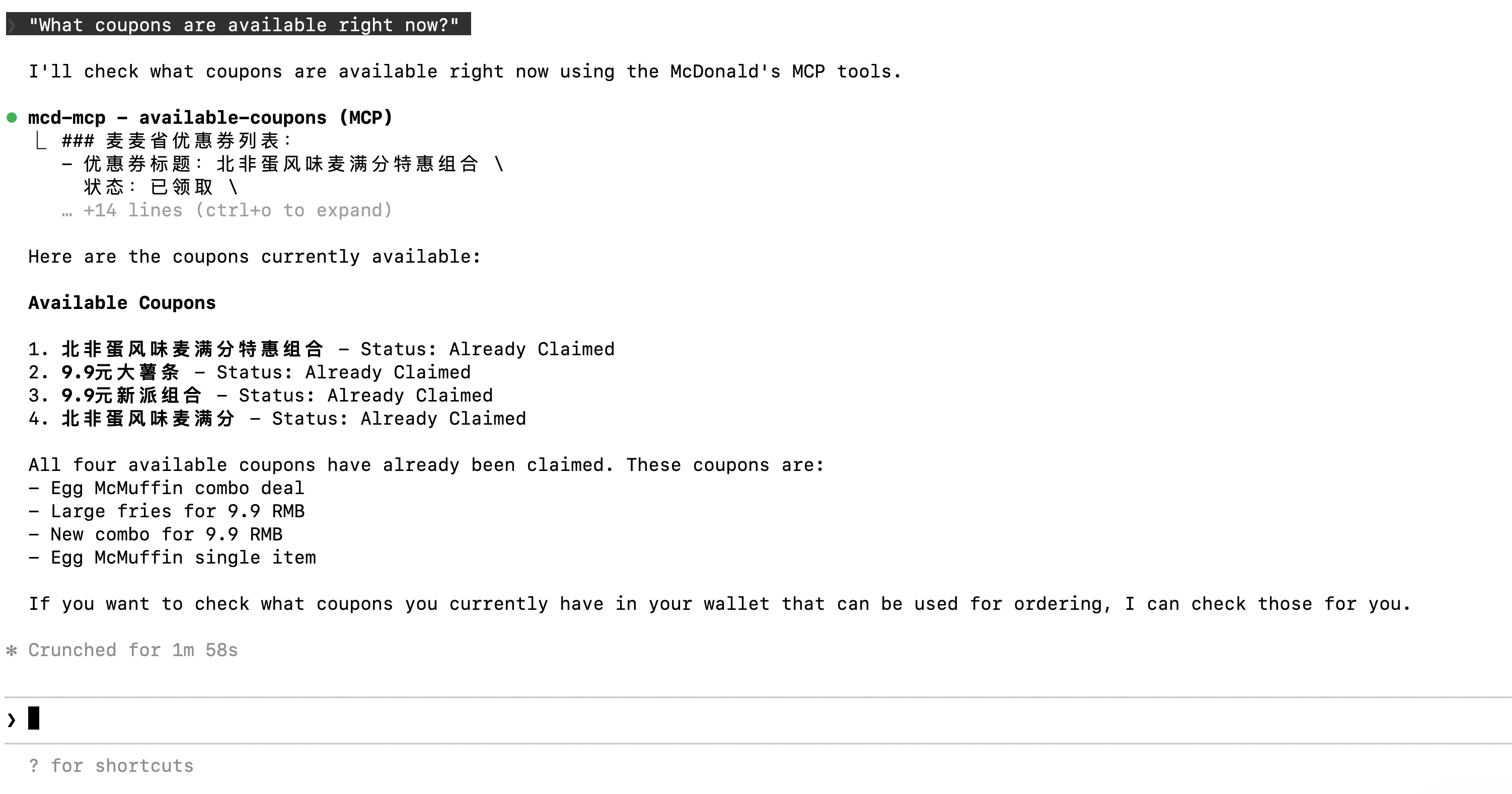
提问: “What coupons are available right now?”

将 “xxx” 替换为你的 Token,并将以下设置添加到用户级或项目级配置文件中。

JSON 文件配置

Code
{
"mcpServers": {
    "mcd-mcp": {
      "url": "https://mcp.mcd.cn/mcp-servers/mcd-mcp",
      "headers": {
        "Authorization": "Bearer xxx"
      }
    }
  } 
} 

用户级配置:

~/.gemini/settings.json

项目级配置:

your_project/.gemini/settings.json
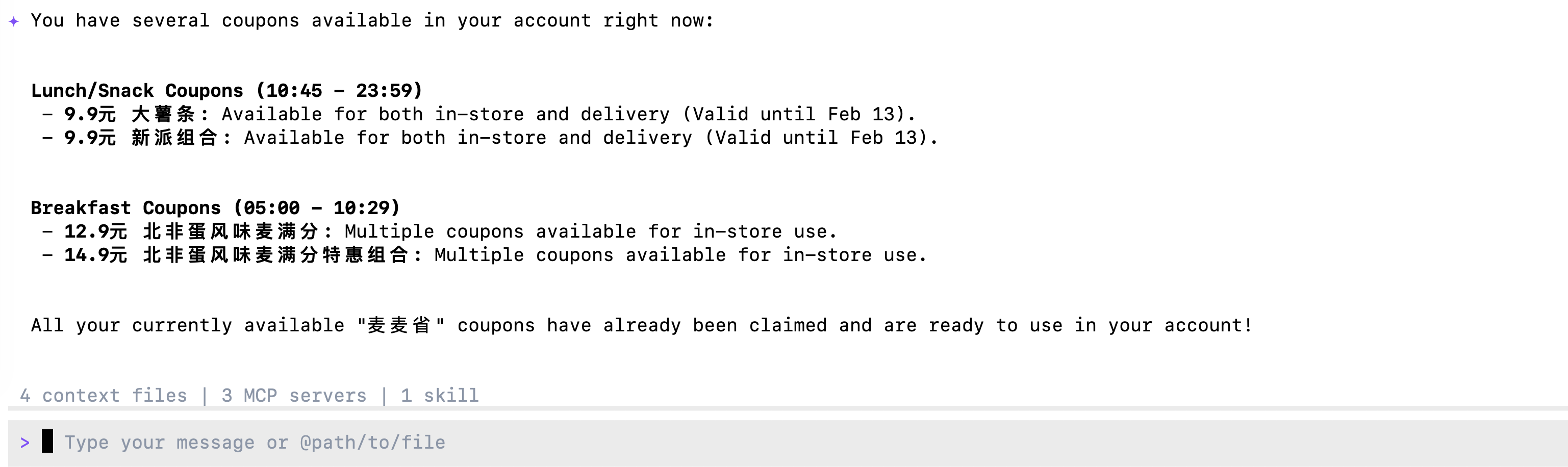
提问: “What coupons are available right now?”

将 “xxx” 替换为你的 Token,并将以下设置添加到用户级或项目级配置文件中。

JSON 文件配置

Code
{
  "$schema": "https://opencode.ai/config.json",
  "mcp": {
    "mcd-mcp": {
      "type": "remote",
      "url": "https://mcp.mcd.cn/mcp-servers/mcd-mcp",
      "enabled": true,
      "headers": {
        "Authorization": "Bearer xxx"
      }
    }
  }
}

用户级配置:

~/.opencode.json

项目级配置:

.config/opencode/opencode.json
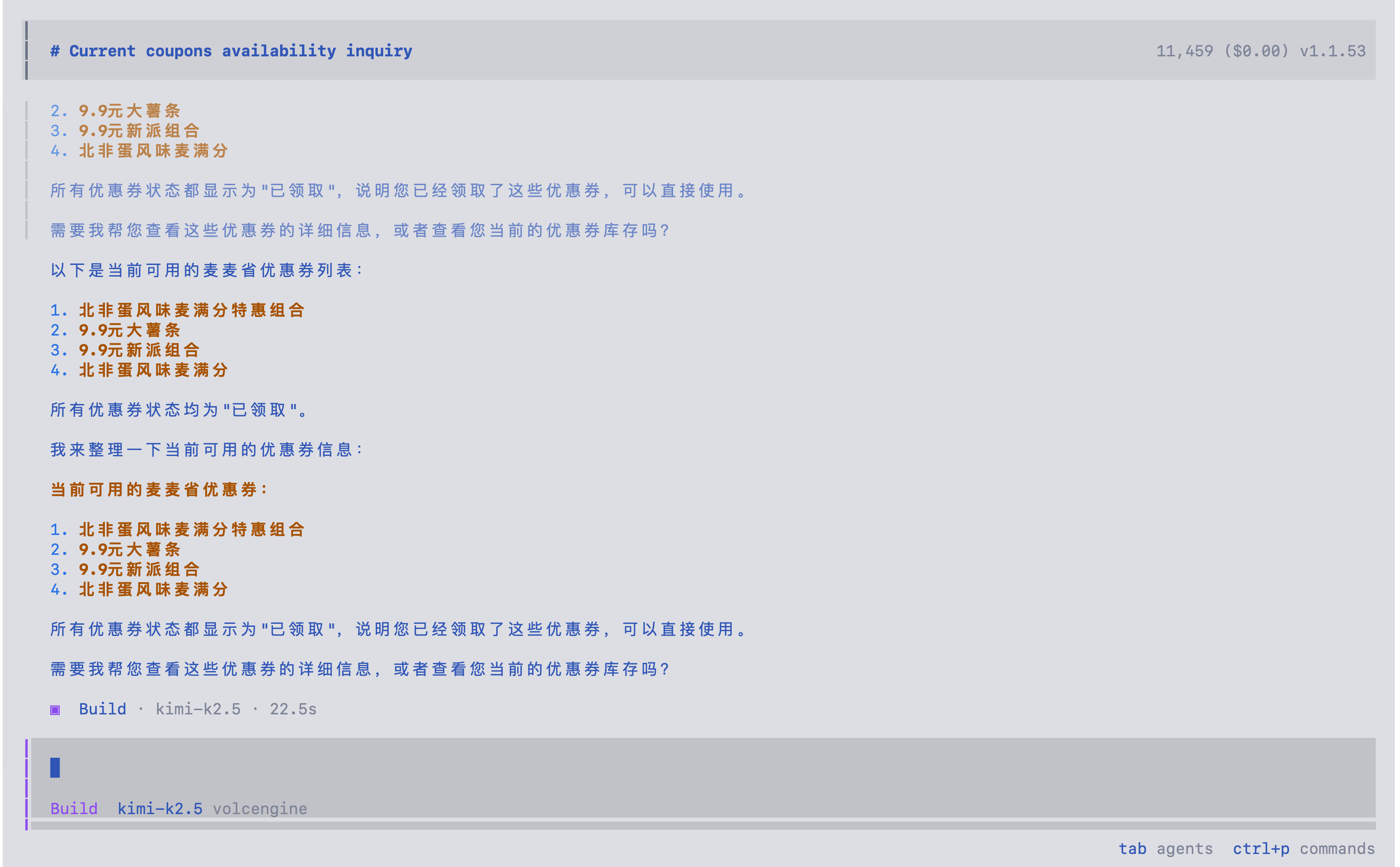
提问: “What coupons are available right now?”

将 “xxx” 替换为你的 Token,并将以下设置添加到用户级或项目级配置文件中。

JSON 文件配置

Code
{
  "mcpServers": {
    "mcd-mcp": {
      "serverUrl": "https://mcp.mcd.cn/mcp-servers/mcd-mcp",
      "headers": {
        "Authorization": "Bearer xxx"
      }
    }
  }
}

用户级配置:

~/.gemini/antigravity/mcp_config.json

项目级配置:

暂不支持
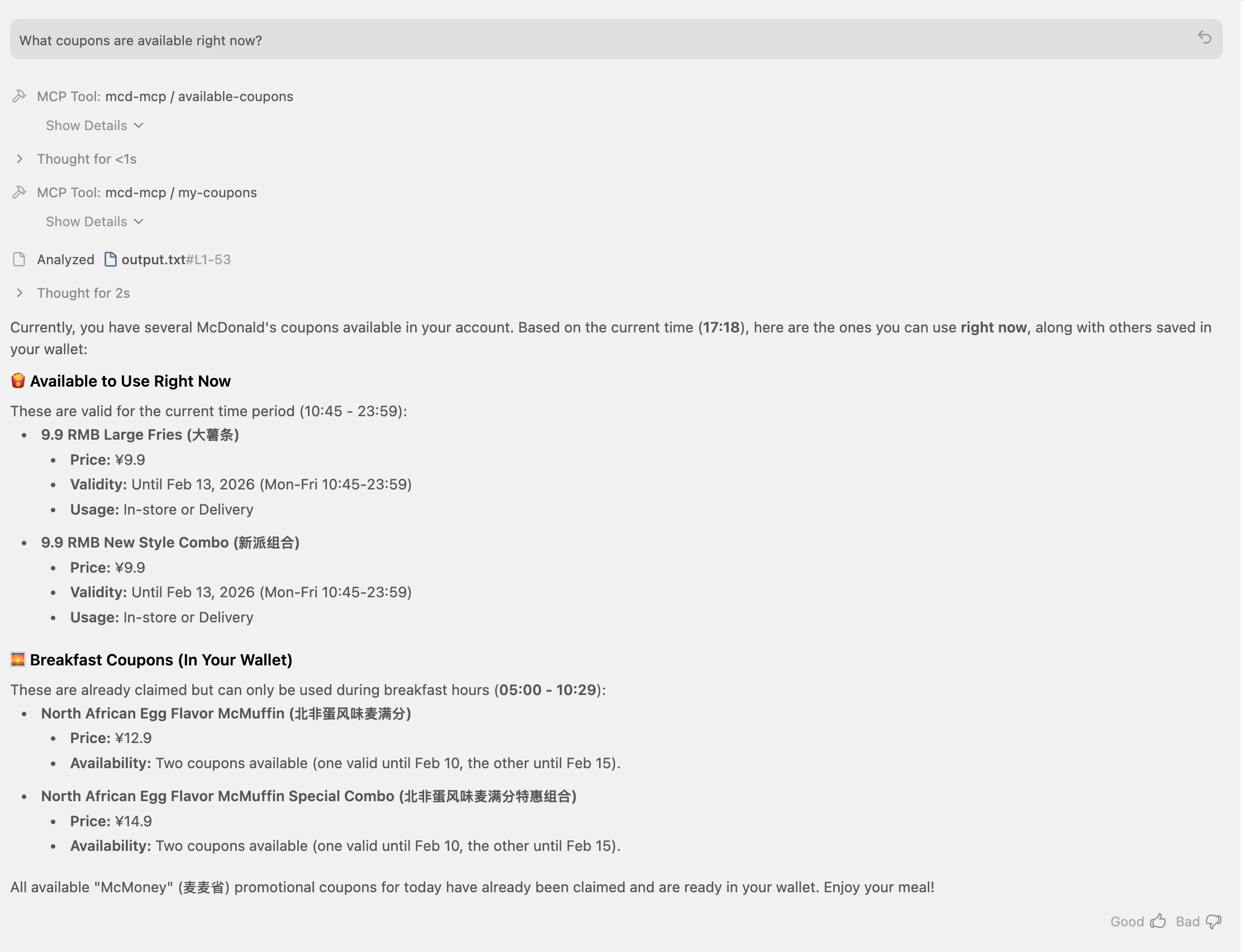
提问: “What coupons are available right now?”

将 “xxx” 替换为你的 Token,并将以下设置添加到用户级或项目级配置文件中。

JSON 文件配置

Code
{
  "mcpServers": {
    "mcd-mcp": {
      "command": "npx",
      "args": [
        "mcp-remote",
        "https://mcp.mcd.cn/mcp-servers/mcd-mcp",
        "--header",
        "Authorization: Bearer xxx"
      ]
    }
  }
}

用户级配置:

~/user/Library/Application Support/Trae/User/mcp.json

项目级配置:

your_project/.trae/mcp.json
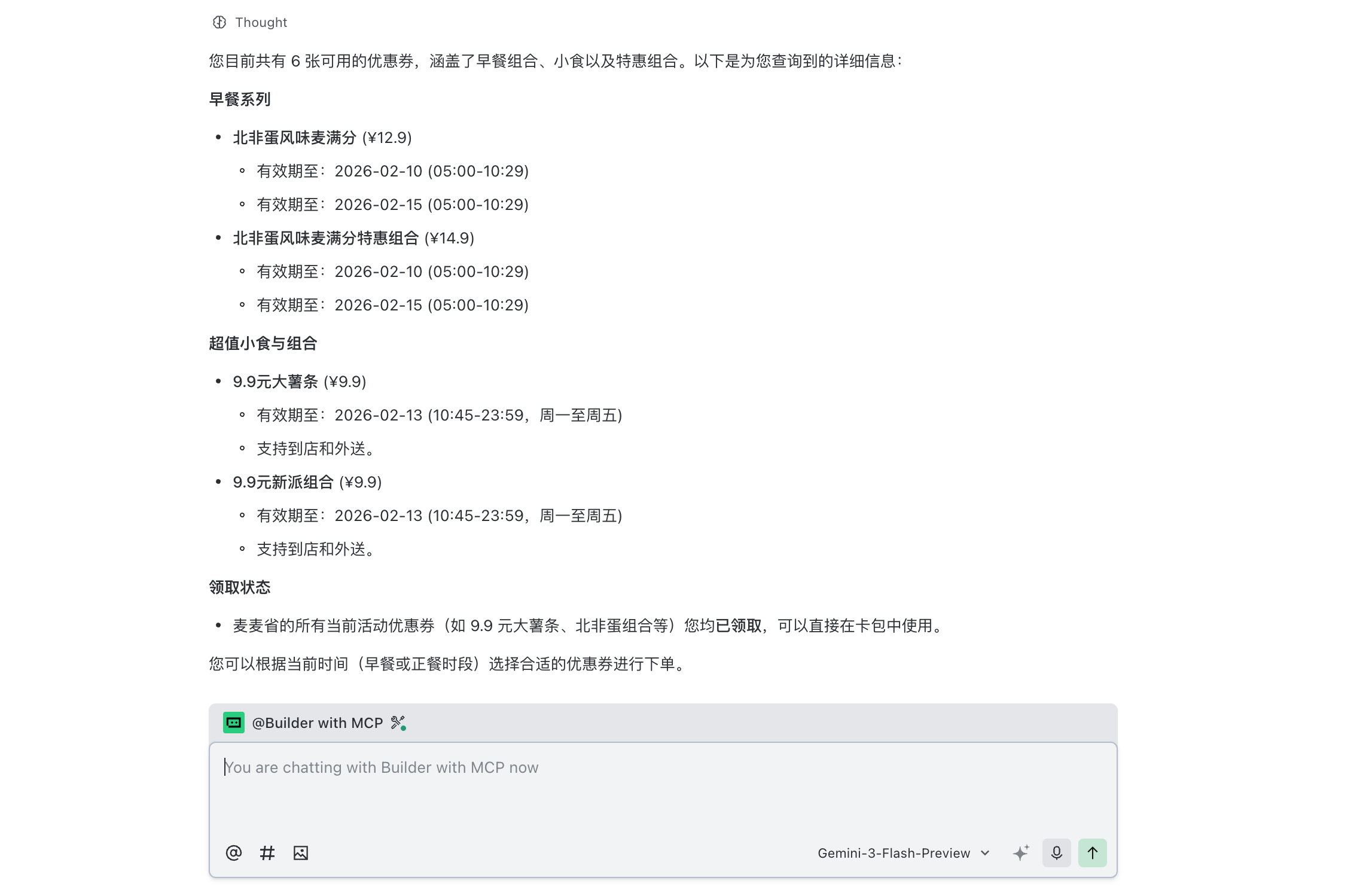
开启 Trae 项目级设置: Setting -> Beta -> Enable project MCP

切换模式为 @Builder 并提问: “What coupons are available right now?”

Coming soon

Coming soon

Coming soon

Source Code
---
title: "MCP 教程:将麦当劳服务与 AI Agent 集成"
author: "Tony D"
date: "2025-11-02"
categories: [AI, API, tutorial]
image: "images/0.png"
format:
  html:
    code-fold: show
    code-tools: true
    code-copy: false
execute:
  warning: false
editor: 
  markdown: 
    wrap: 72
---

# 什么是模型上下文协议 (MCP)?

**模型上下文协议 (Model Context Protocol, MCP)** 是一项开放标准,旨在使 AI 模型能够无缝连接外部数据源和工具。
它由 Anthropic 开发,充当一个通用接口(类似于 USB 接口),允许开发者为大语言模型(LLM)提供对本地文件、数据库和第三方 API 的标准化、安全访问,而无需为每个特定服务编写自定义集成。

通过使用 MCP,AI Agent 可以“触及”物理世界,执行诸如查看库存、查询营养数据,甚至领取优惠券等任务——正如我们将在本教程中使用麦当劳服务所演示的那样。

# 设置 MCP

## 获取密钥

1.  从 https://openrouter.ai 获取 LLM 模型 API Key。

2.  从 https://open.mcd.cn/mcp 获取访问 mcd-mcp 的 `MCD_TOKEN`。

并将它们保存到 `.env` 文件中:

```{r}
#| eval: false
OPENROUTER_API_KEY=xxxxxx

MCD_TOKEN=XXXX
```

# 在代码中使用 MCP

::: panel-tabset
## R 代码实现

### 初始化集成 MCP 工具的聊天

```{r}
library(ellmer)
library(mcptools)
library(dotenv)
# Load environment variables
load_dot_env(file = ".env")

# Define model 
model_name <- "x-ai/grok-4.1-fast"
```

```{r}
# Create an ellmer chat object (using OpenRouter as example)
chat <- chat_openrouter(
  system_prompt = "您是一位麦当劳助手。请简短回答。",
  api_key = Sys.getenv("OPENROUTER_API_KEY"),
  model = model_name,
  echo = "output"
)

# Create dynamic configuration with token from environment
config_data <- list(
  mcpServers = list(
    "mcd-mcp" = list(
      command = "npx",
      args = c(
        "mcp-remote",
        "https://mcp.mcd.cn/mcp-servers/mcd-mcp",
        "--header",
        paste0("Authorization: Bearer ", Sys.getenv("MCD_TOKEN"))
      )
    )
  )
)

config_file <- tempfile(fileext = ".json")
jsonlite::write_json(config_data, config_file, auto_unbox = TRUE)

# Load MCP tools via the temporary configuration file
mcd_tools <- mcp_tools(config = config_file)

# Register the MCP tools with the chat
chat$set_tools(mcd_tools)
```

### 集成 MCP 的对话测试

现在你可以提问,AI 将使用麦当劳 MCP 工具:

```{r}
# Query available coupons
chat$chat("目前有什么优惠券")
```

```{r}
# Auto-claim all coupons
chat$chat("帮我领取所有优惠券")
```


```{r}
# Get nutrition information
chat$chat("帮我建议一个1000卡路里的套餐,需要包括有糖可乐。")
```

## Python 代码实现

### 初始化集成 MCP 工具的聊天

```{python}
#| eval: false
import os
import asyncio
from dotenv import load_dotenv
from langchain_mcp_adapters.client import MultiServerMCPClient
from langchain_openai import ChatOpenAI
from langgraph.prebuilt import create_react_agent

# Load environment variables
load_dotenv()

# Define model (using OpenRouter)
model_name = "x-ai/grok-4.1-fast"

# Create the LLM with OpenRouter
llm = ChatOpenAI(
    model=model_name,
    openai_api_key=os.getenv("OPENROUTER_API_KEY"),
    openai_api_base="https://openrouter.ai/api/v1",
    temperature=0
)

# Build the mcp-remote command with authorization header
mcd_token = os.getenv("MCD_TOKEN")
mcp_command_args = [
    "mcp-remote",
    "https://mcp.mcd.cn/mcp-servers/mcd-mcp",
    "--header",
    f"Authorization: Bearer {mcd_token}"
]

# Configure the MCP client
mcp_config = {
    "mcd-mcp": {
        "command": "npx",
        "args": mcp_command_args,
        "transport": "stdio"
    }
}

async def run_mcp_agent(query: str):
    """Run an MCP-enabled agent with the given query."""
    # Create client (no context manager in v0.1.0+)
    client = MultiServerMCPClient(mcp_config)
    
    # Get tools from MCP server (await required)
    tools = await client.get_tools()
    
    # Create a ReAct agent with the tools
    agent = create_react_agent(llm, tools)
    
    # Run the agent
    result = await agent.ainvoke({
        "messages": [
            {"role": "system", "content": "You are a helpful assistant that can interact with McDonald's services. Please be concise."},
            {"role": "user", "content": query}
        ]
    })
    
    # Return the final response
    return result["messages"][-1].content
```

### 集成 MCP 的对话测试

现在你可以提问,AI 将使用麦当劳 MCP 工具:

```{python}
#| eval: false
# Query available coupons
asyncio.run(run_mcp_agent("What coupons are available right now?"))
```

```{python}
#| eval: false
# Auto-claim all coupons
asyncio.run(run_mcp_agent("Help me claim all available coupons."))
```

```{python}
#| eval: false
# Check your coupons
asyncio.run(run_mcp_agent("Show me all my current coupons."))
```

```{python}
#| eval: false
# Query campaign calendar
asyncio.run(run_mcp_agent("What exciting activities are happening in the next 15 days?"))
```

```{python}
#| eval: false
# Get nutrition information
asyncio.run(run_mcp_agent("Help me design a 1000-calorie meal that includes a sugared cola and costs no more than 30 yuan."))
```
:::

# 在 Agent 中使用 MCP

::: panel-tabset
## Claude Code CLI

将 "xxx" 替换为你的 Token,并将以下设置添加到用户级或项目级配置文件中。

### JSON 文件配置

```{r}
#| eval: false
{
  "mcpServers": {
    "mcd-mcp": {
      "type": "http",
      "url": "https://mcp.mcd.cn/mcp-servers/mcd-mcp",
      "headers": {
        "Authorization": "Bearer xxx"
      }
    }
  }
}
```

*用户级配置文件*:

\~/.claude.json

*项目级配置文件*:

your_project/.mcp.json

### 提问: "What coupons are available right now?"

![](images/clipboard-3343486679.png){width="700"}

## Gemini CLI

将 "xxx" 替换为你的 Token,并将以下设置添加到用户级或项目级配置文件中。

### JSON 文件配置

```{python}
#| eval: false
{
"mcpServers": {
    "mcd-mcp": {
      "url": "https://mcp.mcd.cn/mcp-servers/mcd-mcp",
      "headers": {
        "Authorization": "Bearer xxx"
      }
    }
  } 
} 
```

*用户级配置*:

\~/.gemini/settings.json

*项目级配置*:

your_project/.gemini/settings.json

### 提问: "What coupons are available right now?"

![](images/clipboard-1202098417.png){width="700"}

## Opencode CLI

将 "xxx" 替换为你的 Token,并将以下设置添加到用户级或项目级配置文件中。

### JSON 文件配置

```{python}
#| eval: false
{
  "$schema": "https://opencode.ai/config.json",
  "mcp": {
    "mcd-mcp": {
      "type": "remote",
      "url": "https://mcp.mcd.cn/mcp-servers/mcd-mcp",
      "enabled": true,
      "headers": {
        "Authorization": "Bearer xxx"
      }
    }
  }
}
```

*用户级配置*:

\~/.opencode.json

*项目级配置*:

.config/opencode/opencode.json

### 提问: "What coupons are available right now?"

![](images/clipboard-4015309059.png)

## Antigravity IDE

将 "xxx" 替换为你的 Token,并将以下设置添加到用户级或项目级配置文件中。

### JSON 文件配置

```{python}
#| eval: false
{
  "mcpServers": {
    "mcd-mcp": {
      "serverUrl": "https://mcp.mcd.cn/mcp-servers/mcd-mcp",
      "headers": {
        "Authorization": "Bearer xxx"
      }
    }
  }
}
```

*用户级配置*:

\~/.gemini/antigravity/mcp_config.json

*项目级配置*:

暂不支持

### 提问: "What coupons are available right now?"

![](images/clipboard-4292207523.png)

## Trae IDE

将 "xxx" 替换为你的 Token,并将以下设置添加到用户级或项目级配置文件中。

### JSON 文件配置

```{python}
#| eval: false
{
  "mcpServers": {
    "mcd-mcp": {
      "command": "npx",
      "args": [
        "mcp-remote",
        "https://mcp.mcd.cn/mcp-servers/mcd-mcp",
        "--header",
        "Authorization: Bearer xxx"
      ]
    }
  }
}
```


*用户级配置*:

\~/user/Library/Application Support/Trae/User/mcp.json

*项目级配置*:

your_project/.trae/mcp.json

### 开启 Trae 项目级设置: Setting -> Beta -> Enable project MCP

### 切换模式为 @Builder 并提问: "What coupons are available right now?"

![](images/clipboard-1218453575.png)


## Cody Buddy

Coming soon

## Qoder

Coming soon

## Cline VS Code

Coming soon

:::


This blog is built with ❤️ and Quarto.