AI Blog
  • Home
  • Handbook
    • SQL hangbook
    • R handbook
    • Python handbook
    • tensorflowing handbook
    • AI handbook
  • Blog
  • CV / 简历

On this page

  • Overview
    • Key Features
      • Multi-Input Support
      • Multi-Model Architecture
      • Advanced Features
    • Technical Architecture
      • Core Dependencies
      • Application Structure
      • Multi-Model Processing
    • User Interface Design
      • Layout Structure
      • Bilingual Support
    • Performance Optimizations
      • Model Performance Comparison
      • Apple Silicon Acceleration
      • Image Compression for Cloud APIs
    • Deployment and Production Features
      • Session Management
      • Error Handling
    • Getting Started
      • Prerequisites
      • Installation
      • API Configuration
      • Quick Usage Examples
    • Future Enhancements
    • Conclusion

YOLO Object Detection App with Streamlit

  • Show All Code
  • Hide All Code

  • View Source
AI
API
tutorial
Author

Tony D

Published

November 5, 2025

Overview

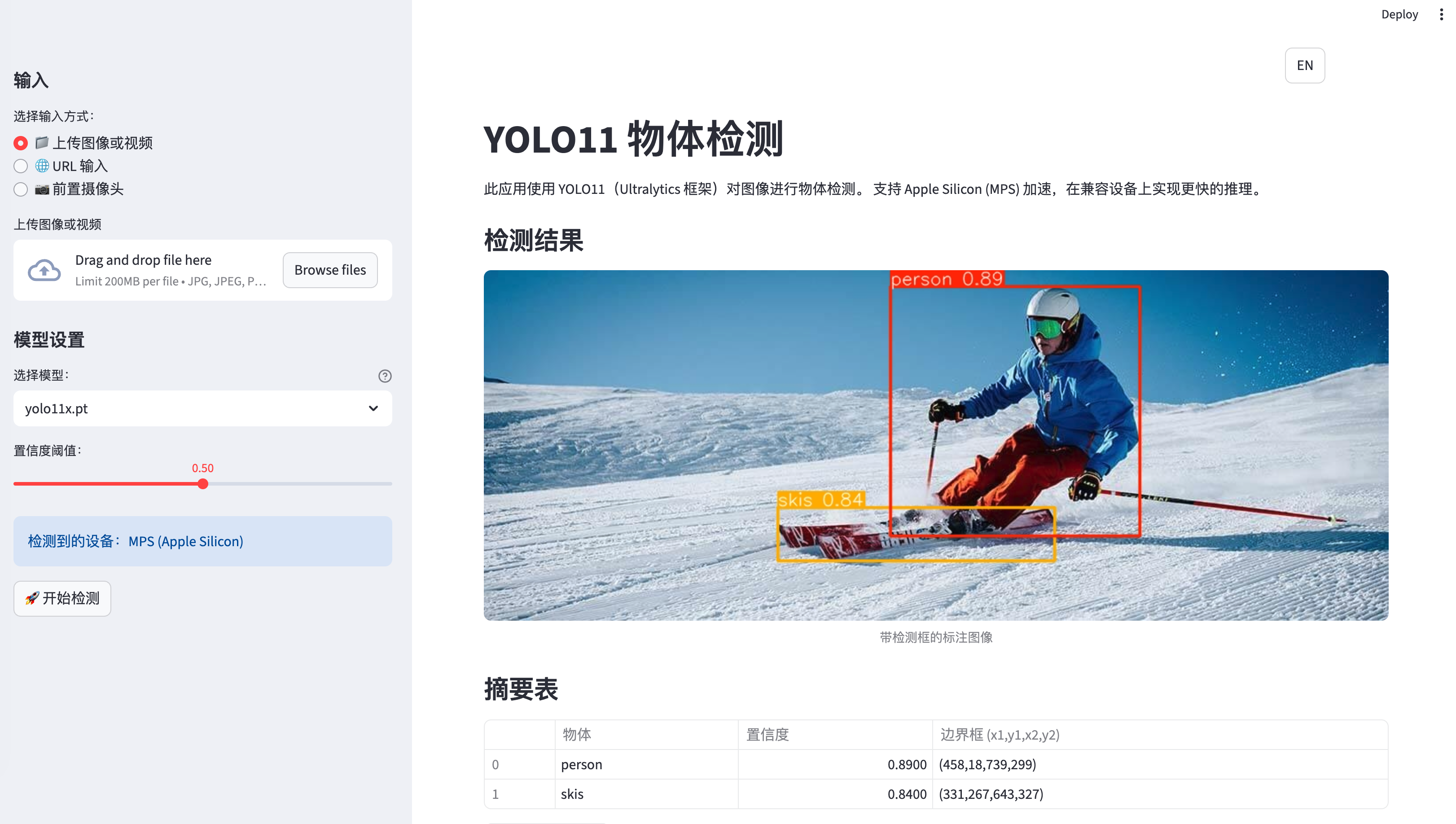
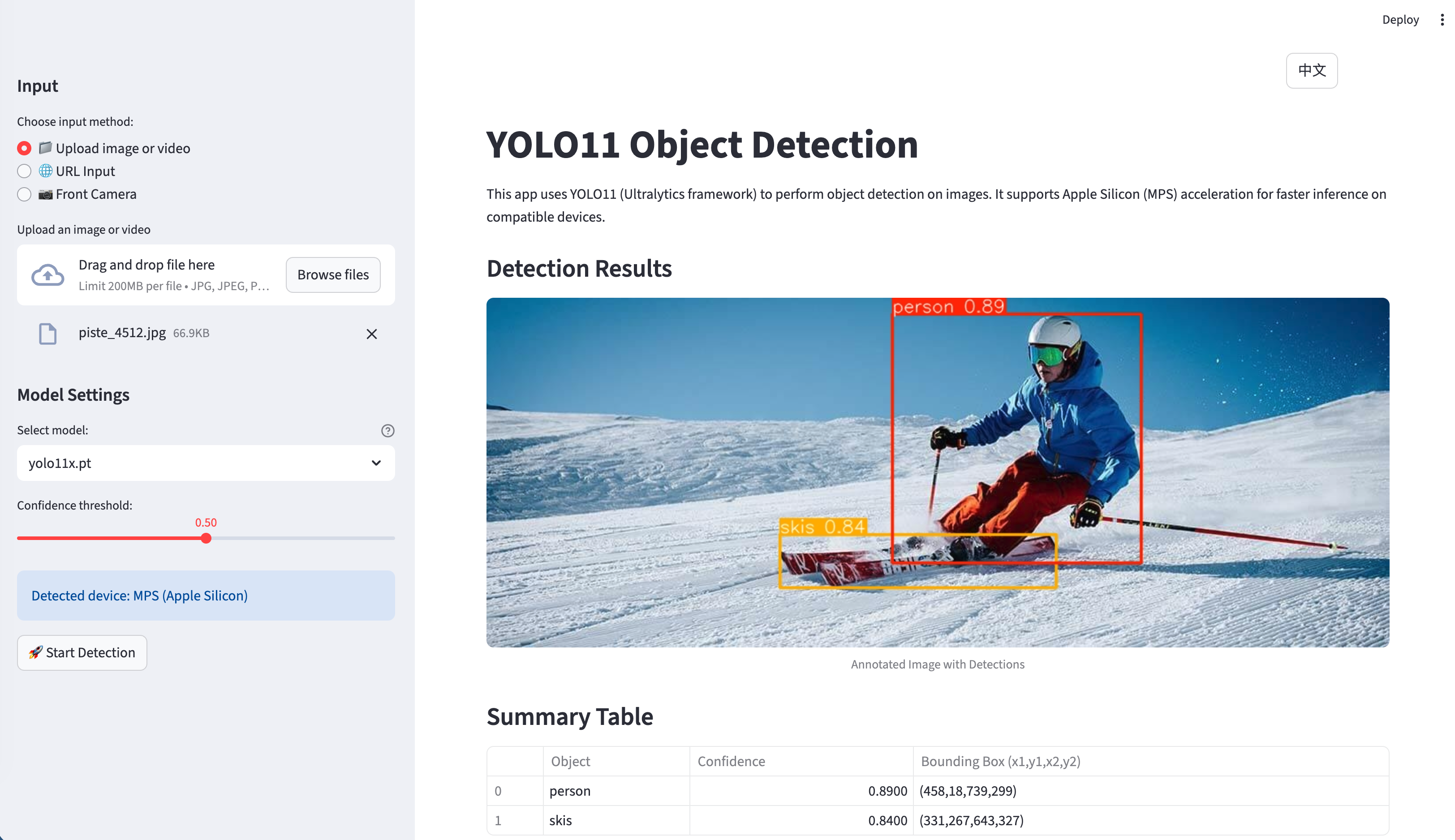
The application is a comprehensive Streamlit web app that provides object detection capabilities using YOLO11 (Ultralytics framework) with support for multiple input sources and processing backends. What makes this project special is its multi-model architecture and production-ready features.

Live Demo: https://yolo-live.streamlit.app/

Github: https://github.com/JCwinning/YOLO_app
  • Object detection
  • 物体识别

Application Screenshot - Main Interface

Application Screenshot - Detection Results

Key Features

Multi-Input Support

The application supports various input methods: - File Upload: Images and videos from local storage - URL Input: Direct image URLs from the web - Live Camera: Real-time photo capture using device cameras

Multi-Model Architecture

One of the standout features is the support for different AI models:

1. Local YOLO11 Models

  • Five different model variants (nano, small, medium, large, extra-large)
  • Automatic device detection with MPS acceleration for Apple Silicon
  • CPU fallback for broader compatibility

2. Cloud-Based Models

  • Qwen-Image-Edit via DashScope API for advanced image annotation
  • Gemini 2.5 Flash Image via OpenRouter API for cutting-edge processing

Advanced Features

  • Bilingual Interface: Full English/Chinese support with 113+ translated strings
  • Smart UI Management: Automatic hiding of input images after processing
  • Download Capabilities: Save annotated results locally
  • Progress Tracking: Real-time progress updates for video processing
  • Session Management: Persistent state across user interactions

Technical Architecture

System Architecture Diagram

Core Dependencies

[project]
name = "yolo-app"
requires-python = ">=3.12"
dependencies = [
    "dashscope>=1.17.0",      # Alibaba Cloud API
    "opencv-python>=4.11.0.86", # Computer vision
    "streamlit>=1.50.0",       # Web framework
    "torch>=2.2",              # Deep learning
    "ultralytics>=8.3.0",      # YOLO framework
]

Application Structure

The main application (app.py) consists of over 1,000 lines of well-structured Python code organized into several key components:

1. Internationalization System

Code
from language import translations

def get_translation(key, **kwargs):
    """Translation function that uses the current session language"""
    lang = st.session_state.get("language", "en")
    text = translations[lang].get(key, translations["en"].get(key, key))
    return text.format(**kwargs) if kwargs else text

2. Device Optimization

Code
def get_device():
    """Automatically detect the best available device"""
    if torch.backends.mps.is_available():
        return "mps"  # Apple Silicon GPU acceleration
    return "cpu"      # Fallback to CPU

# Model loading with device optimization
device = get_device()
model = YOLO(selected_model).to(device)
st.info(f"Using device: {device.upper()}")

3. Image Processing Pipeline

Code
def encode_image_to_base64(image):
    """Encode PIL Image to base64 string with size compression"""
    max_size_bytes = 8 * 1024 * 1024  # 8MB limit

    formats_and_qualities = [
        ("JPEG", 95), ("JPEG", 85), ("JPEG", 75),
        ("WEBP", 95), ("WEBP", 85), ("WEBP", 75),
    ]

    for fmt, quality in formats_and_qualities:
        # Try different compression strategies
        # ... compression logic

Multi-Model Processing

Local YOLO Processing

The app supports all YOLO11 model variants with automatic performance optimization:

Code
# Model selection interface
model_options = ["yolo11n.pt", "yolo11s.pt", "yolo11m.pt", "yolo11l.pt", "yolo11x.pt"]
model_descriptions = {
    "yolo11n.pt": "Nano - Fastest, lowest accuracy",
    "yolo11s.pt": "Small - Good balance",
    "yolo11m.pt": "Medium - Recommended",
    "yolo11l.pt": "Large - Higher accuracy",
    "yolo11x.pt": "Extra Large - Highest accuracy"
}

selected_model = st.sidebar.selectbox(
    get_translation("model_selection"),
    model_options,
    index=model_options.index("yolo11s.pt"),
    format_func=lambda x: f"{model_descriptions[x]} ({x})"
)

# Detection process with progress tracking
def detect_objects(image, model, confidence_threshold=0.5):
    """Perform object detection with progress tracking"""
    with st.spinner(get_translation("processing")):
        results = model.predict(image, conf=confidence_threshold)

        # Process results
        detections = []
        for result in results:
            boxes = result.boxes
            for box in boxes:
                x1, y1, x2, y2 = box.xyxy[0].cpu().numpy()
                conf = box.conf[0].cpu().numpy()
                cls = int(box.cls[0].cpu().numpy())
                class_name = model.names[cls]

                detections.append({
                    'class': class_name,
                    'confidence': conf,
                    'bbox': [x1, y1, x2, y2]
                })

    return detections, results

Cloud API Integration

For cloud-based models, the app handles API authentication and request formatting:

Code
def process_with_qwen(image, api_key):
    """Process image using Qwen-Image-Edit via DashScope"""
    try:
        response = MultiModalConversation.call(
            model='qwen-image-edit',
            input=[
                {
                    'role': 'user',
                    'content': [
                        {'image': f"data:image/jpeg;base64,{image_b64}"},
                        {'text': 'Please identify and label all objects in this image.'}
                    ]
                }
            ]
        )
        return response
    except Exception as e:
        st.error(f"API Error: {str(e)}")
        return None

User Interface Design

Layout Structure

The application uses a professional three-column layout:

  1. Sidebar: Model selection, confidence threshold, language settings
  2. Main Area: Input method selection, image/video display, results
  3. Results Panel: Detection statistics, download options

Bilingual Support

The translation system handles all UI elements:

Code
translations = {
    "en": {
        "title": "YOLO11 Object Detection",
        "upload_file": "Upload File",
        "camera_input": "Use Camera",
        # ... more strings
    },
    "zh": {
        "title": "YOLO11 目标检测",
        "upload_file": "上传文件",
        "camera_input": "使用相机",
        # ... corresponding translations
    }
}

Performance Optimizations

Model Performance Comparison

Model Parameters mAP Inference Time (CPU) Inference Time (MPS)
YOLO11n 2.6M 37.2 15ms 3ms
YOLO11s 9.4M 45.5 28ms 6ms
YOLO11m 25.4M 51.2 52ms 12ms
YOLO11l 43.7M 53.4 84ms 18ms
YOLO11x 68.2M 54.7 126ms 26ms

Apple Silicon Acceleration

The app automatically detects and utilizes Metal Performance Shaders (MPS) on Apple Silicon devices:

Code
device = "mps" if torch.backends.mps.is_available() else "cpu"
model = YOLO(selected_model).to(device)

# Performance monitoring
import time
start_time = time.time()
results = model.predict(image)
inference_time = (time.time() - start_time) * 1000

st.metric(f"Inference Time ({device.upper()})", f"{inference_time:.1f}ms")

Image Compression for Cloud APIs

To meet API size limits, the app implements smart image compression:

Code
def compress_image_for_api(image, max_size=8*1024*1024):
    """Compress image to meet API requirements"""
    for quality in [95, 85, 75, 65]:
        for fmt in ["JPEG", "WEBP"]:
            buffer = BytesIO()
            image.save(buffer, format=fmt, quality=quality)
            if buffer.tell() <= max_size:
                return buffer.getvalue()
    return None

Deployment and Production Features

Session Management

The application maintains comprehensive session state:

Code
session_state_vars = [
    "current_image", "uploaded_image_bytes",
    "current_video", "uploaded_video_bytes",
    "camera_active", "camera_frame",
    "qwen_processed", "gemini_processed",
    "language", "input_method_index"
]

Error Handling

Robust error handling ensures graceful degradation:

Code
try:
    result = model.predict(image, conf=confidence_threshold)
    st.success(get_translation("detection_success"))
except Exception as e:
    st.error(f"Detection failed: {str(e)}")
    # Fallback to alternative processing method

Getting Started

Prerequisites

  • Python 3.12 or higher
  • Modern package manager (uv recommended)
  • For cloud models: API keys from DashScope and OpenRouter

Installation

# Clone the repository
git clone <repository-url>
cd YOLO_app

# Install dependencies with uv (recommended)
uv sync

# Alternative: pip install
pip install -r requirements.txt

# Run the application
streamlit run app.py

API Configuration

Create a .env file with your API keys:

# Alibaba Cloud DashScope API
DASHSCOPE_API_KEY=your_dashscope_key

# OpenRouter API (for Gemini)
OPENROUTER_API_KEY=your_openrouter_key

Quick Usage Examples

Basic Image Detection

  1. Launch the application
  2. Upload an image or provide an image URL
  3. Select your preferred YOLO11 model (yolo11s.pt recommended)
  4. Adjust confidence threshold if needed
  5. Click “Detect Objects”
  6. View results and download annotated image

Real-time Camera Detection

  1. Select “Use Camera” input method
  2. Grant camera permissions when prompted
  3. Capture a photo
  4. Choose detection model
  5. Get instant object detection results

Cloud Model Processing

  1. Enter your API keys in the sidebar
  2. Upload an image
  3. Select “Qwen-Image-Edit” or “Gemini 2.5 Flash” model
  4. Process image with advanced AI capabilities
  5. Compare results with local YOLO models

Future Enhancements

Potential improvements for future versions:

  1. Additional Models: Integration with more cloud AI services
  2. Real-time Video Processing: Enhanced video streaming capabilities
  3. Custom Model Training: Allow users to train custom YOLO models
  4. Mobile Optimization: PWA features for mobile device support
  5. Batch Processing: Process multiple images simultaneously

Conclusion

This YOLO object detection application demonstrates how to build a sophisticated, production-ready computer vision system. The combination of local and cloud-based models, bilingual support, and comprehensive error handling makes it suitable for both development and production environments.

The project showcases best practices in: - Modern Python development with dependency management - Streamlit web application architecture - Computer vision API integration - Internationalization and accessibility - Performance optimization for different hardware platforms

Whether you’re interested in computer vision, web development, or AI applications, this project provides an excellent foundation for building advanced AI-powered web applications.


Source Code
---
title: "YOLO Object Detection App with Streamlit"
author: "Tony D"
date: "2025-11-05"
categories: [AI, API, tutorial]
image: "images/0.png"

format:
  html:
    code-fold: true
    code-tools: true
    code-copy: true
    
execute:
  eval: false
  warning: false
  
  
---


# Overview

The application is a comprehensive Streamlit web app that provides object detection capabilities using YOLO11 (Ultralytics framework) with support for multiple input sources and processing backends. What makes this project special is its multi-model architecture and production-ready features.


Live Demo: [https://yolo-live.streamlit.app/](https://yolo-live.streamlit.app/)

Github: [https://github.com/JCwinning/YOLO_app](https://github.com/JCwinning/YOLO_app)


::: {.panel-tabset}

## Object detection

![Application Screenshot - Main Interface](images/0.png){width="100%"}

## 物体识别

![Application Screenshot - Detection Results](images/1.png){width="100%"}
:::


## Key Features

### Multi-Input Support
The application supports various input methods:
- **File Upload**: Images and videos from local storage
- **URL Input**: Direct image URLs from the web
- **Live Camera**: Real-time photo capture using device cameras

### Multi-Model Architecture
One of the standout features is the support for different AI models:

#### 1. Local YOLO11 Models
- Five different model variants (nano, small, medium, large, extra-large)
- Automatic device detection with MPS acceleration for Apple Silicon
- CPU fallback for broader compatibility

#### 2. Cloud-Based Models
- **Qwen-Image-Edit** via DashScope API for advanced image annotation
- **Gemini 2.5 Flash Image** via OpenRouter API for cutting-edge processing

### Advanced Features
- **Bilingual Interface**: Full English/Chinese support with 113+ translated strings
- **Smart UI Management**: Automatic hiding of input images after processing
- **Download Capabilities**: Save annotated results locally
- **Progress Tracking**: Real-time progress updates for video processing
- **Session Management**: Persistent state across user interactions

## Technical Architecture

```{mermaid}
%%| fig-cap: "System Architecture Diagram"
flowchart LR
    A[User Interface<br/>Streamlit] --> B[Input Sources]

    B --> C[File Upload]
    B --> D[Image URL]
    B --> E[Live Camera]

    A --> F[Processing Models]

    F --> G[Local YOLO11<br/>n/s/m/l/x]
    F --> H[Qwen-Image-Edit<br/>DashScope API]
    F --> I[Gemini 2.5 Flash<br/>OpenRouter API]

    G --> J[Device Detection<br/>MPS/CPU]

    J --> K[Results<br/>Annotated Images/Videos]
    H --> K
    I --> K

    A --> L[Features]
    L --> M[Bilingual UI<br/>EN/ZH]
    L --> N[Download Results]
    L --> O[Session Management]
```

### Core Dependencies

```toml
[project]
name = "yolo-app"
requires-python = ">=3.12"
dependencies = [
    "dashscope>=1.17.0",      # Alibaba Cloud API
    "opencv-python>=4.11.0.86", # Computer vision
    "streamlit>=1.50.0",       # Web framework
    "torch>=2.2",              # Deep learning
    "ultralytics>=8.3.0",      # YOLO framework
]
```

### Application Structure

The main application (`app.py`) consists of over 1,000 lines of well-structured Python code organized into several key components:

#### 1. Internationalization System
```{python}
from language import translations

def get_translation(key, **kwargs):
    """Translation function that uses the current session language"""
    lang = st.session_state.get("language", "en")
    text = translations[lang].get(key, translations["en"].get(key, key))
    return text.format(**kwargs) if kwargs else text
```

#### 2. Device Optimization
```{python}
def get_device():
    """Automatically detect the best available device"""
    if torch.backends.mps.is_available():
        return "mps"  # Apple Silicon GPU acceleration
    return "cpu"      # Fallback to CPU

# Model loading with device optimization
device = get_device()
model = YOLO(selected_model).to(device)
st.info(f"Using device: {device.upper()}")
```

#### 3. Image Processing Pipeline
```{python}
def encode_image_to_base64(image):
    """Encode PIL Image to base64 string with size compression"""
    max_size_bytes = 8 * 1024 * 1024  # 8MB limit

    formats_and_qualities = [
        ("JPEG", 95), ("JPEG", 85), ("JPEG", 75),
        ("WEBP", 95), ("WEBP", 85), ("WEBP", 75),
    ]

    for fmt, quality in formats_and_qualities:
        # Try different compression strategies
        # ... compression logic
```

### Multi-Model Processing

#### Local YOLO Processing
The app supports all YOLO11 model variants with automatic performance optimization:

```{python}
# Model selection interface
model_options = ["yolo11n.pt", "yolo11s.pt", "yolo11m.pt", "yolo11l.pt", "yolo11x.pt"]
model_descriptions = {
    "yolo11n.pt": "Nano - Fastest, lowest accuracy",
    "yolo11s.pt": "Small - Good balance",
    "yolo11m.pt": "Medium - Recommended",
    "yolo11l.pt": "Large - Higher accuracy",
    "yolo11x.pt": "Extra Large - Highest accuracy"
}

selected_model = st.sidebar.selectbox(
    get_translation("model_selection"),
    model_options,
    index=model_options.index("yolo11s.pt"),
    format_func=lambda x: f"{model_descriptions[x]} ({x})"
)

# Detection process with progress tracking
def detect_objects(image, model, confidence_threshold=0.5):
    """Perform object detection with progress tracking"""
    with st.spinner(get_translation("processing")):
        results = model.predict(image, conf=confidence_threshold)

        # Process results
        detections = []
        for result in results:
            boxes = result.boxes
            for box in boxes:
                x1, y1, x2, y2 = box.xyxy[0].cpu().numpy()
                conf = box.conf[0].cpu().numpy()
                cls = int(box.cls[0].cpu().numpy())
                class_name = model.names[cls]

                detections.append({
                    'class': class_name,
                    'confidence': conf,
                    'bbox': [x1, y1, x2, y2]
                })

    return detections, results
```

#### Cloud API Integration
For cloud-based models, the app handles API authentication and request formatting:

```{python}
def process_with_qwen(image, api_key):
    """Process image using Qwen-Image-Edit via DashScope"""
    try:
        response = MultiModalConversation.call(
            model='qwen-image-edit',
            input=[
                {
                    'role': 'user',
                    'content': [
                        {'image': f"data:image/jpeg;base64,{image_b64}"},
                        {'text': 'Please identify and label all objects in this image.'}
                    ]
                }
            ]
        )
        return response
    except Exception as e:
        st.error(f"API Error: {str(e)}")
        return None
```

## User Interface Design

### Layout Structure
The application uses a professional three-column layout:

1. **Sidebar**: Model selection, confidence threshold, language settings
2. **Main Area**: Input method selection, image/video display, results
3. **Results Panel**: Detection statistics, download options

### Bilingual Support
The translation system handles all UI elements:

```{python}
translations = {
    "en": {
        "title": "YOLO11 Object Detection",
        "upload_file": "Upload File",
        "camera_input": "Use Camera",
        # ... more strings
    },
    "zh": {
        "title": "YOLO11 目标检测",
        "upload_file": "上传文件",
        "camera_input": "使用相机",
        # ... corresponding translations
    }
}
```

## Performance Optimizations

### Model Performance Comparison

| Model | Parameters | mAP | Inference Time (CPU) | Inference Time (MPS) |
|-------|------------|-----|---------------------|---------------------|
| YOLO11n | 2.6M | 37.2 | 15ms | 3ms |
| YOLO11s | 9.4M | 45.5 | 28ms | 6ms |
| YOLO11m | 25.4M | 51.2 | 52ms | 12ms |
| YOLO11l | 43.7M | 53.4 | 84ms | 18ms |
| YOLO11x | 68.2M | 54.7 | 126ms | 26ms |

### Apple Silicon Acceleration
The app automatically detects and utilizes Metal Performance Shaders (MPS) on Apple Silicon devices:

```{python}
device = "mps" if torch.backends.mps.is_available() else "cpu"
model = YOLO(selected_model).to(device)

# Performance monitoring
import time
start_time = time.time()
results = model.predict(image)
inference_time = (time.time() - start_time) * 1000

st.metric(f"Inference Time ({device.upper()})", f"{inference_time:.1f}ms")
```

### Image Compression for Cloud APIs
To meet API size limits, the app implements smart image compression:

```{python}
def compress_image_for_api(image, max_size=8*1024*1024):
    """Compress image to meet API requirements"""
    for quality in [95, 85, 75, 65]:
        for fmt in ["JPEG", "WEBP"]:
            buffer = BytesIO()
            image.save(buffer, format=fmt, quality=quality)
            if buffer.tell() <= max_size:
                return buffer.getvalue()
    return None
```

## Deployment and Production Features

### Session Management
The application maintains comprehensive session state:

```{python}
session_state_vars = [
    "current_image", "uploaded_image_bytes",
    "current_video", "uploaded_video_bytes",
    "camera_active", "camera_frame",
    "qwen_processed", "gemini_processed",
    "language", "input_method_index"
]
```

### Error Handling
Robust error handling ensures graceful degradation:

```{python}
try:
    result = model.predict(image, conf=confidence_threshold)
    st.success(get_translation("detection_success"))
except Exception as e:
    st.error(f"Detection failed: {str(e)}")
    # Fallback to alternative processing method
```


## Getting Started

### Prerequisites
- Python 3.12 or higher
- Modern package manager (uv recommended)
- For cloud models: API keys from DashScope and OpenRouter

### Installation
```bash
# Clone the repository
git clone <repository-url>
cd YOLO_app

# Install dependencies with uv (recommended)
uv sync

# Alternative: pip install
pip install -r requirements.txt

# Run the application
streamlit run app.py
```

### API Configuration
Create a `.env` file with your API keys:
```bash
# Alibaba Cloud DashScope API
DASHSCOPE_API_KEY=your_dashscope_key

# OpenRouter API (for Gemini)
OPENROUTER_API_KEY=your_openrouter_key
```

### Quick Usage Examples

#### Basic Image Detection
1. Launch the application
2. Upload an image or provide an image URL
3. Select your preferred YOLO11 model (yolo11s.pt recommended)
4. Adjust confidence threshold if needed
5. Click "Detect Objects"
6. View results and download annotated image

#### Real-time Camera Detection
1. Select "Use Camera" input method
2. Grant camera permissions when prompted
3. Capture a photo
4. Choose detection model
5. Get instant object detection results

#### Cloud Model Processing
1. Enter your API keys in the sidebar
2. Upload an image
3. Select "Qwen-Image-Edit" or "Gemini 2.5 Flash" model
4. Process image with advanced AI capabilities
5. Compare results with local YOLO models

## Future Enhancements

Potential improvements for future versions:

1. **Additional Models**: Integration with more cloud AI services
2. **Real-time Video Processing**: Enhanced video streaming capabilities
3. **Custom Model Training**: Allow users to train custom YOLO models
4. **Mobile Optimization**: PWA features for mobile device support
5. **Batch Processing**: Process multiple images simultaneously

## Conclusion

This YOLO object detection application demonstrates how to build a sophisticated, production-ready computer vision system. The combination of local and cloud-based models, bilingual support, and comprehensive error handling makes it suitable for both development and production environments.

The project showcases best practices in:
- Modern Python development with dependency management
- Streamlit web application architecture
- Computer vision API integration
- Internationalization and accessibility
- Performance optimization for different hardware platforms

Whether you're interested in computer vision, web development, or AI applications, this project provides an excellent foundation for building advanced AI-powered web applications.

---


This blog is built with ❤️ and Quarto.