Introduction to the game
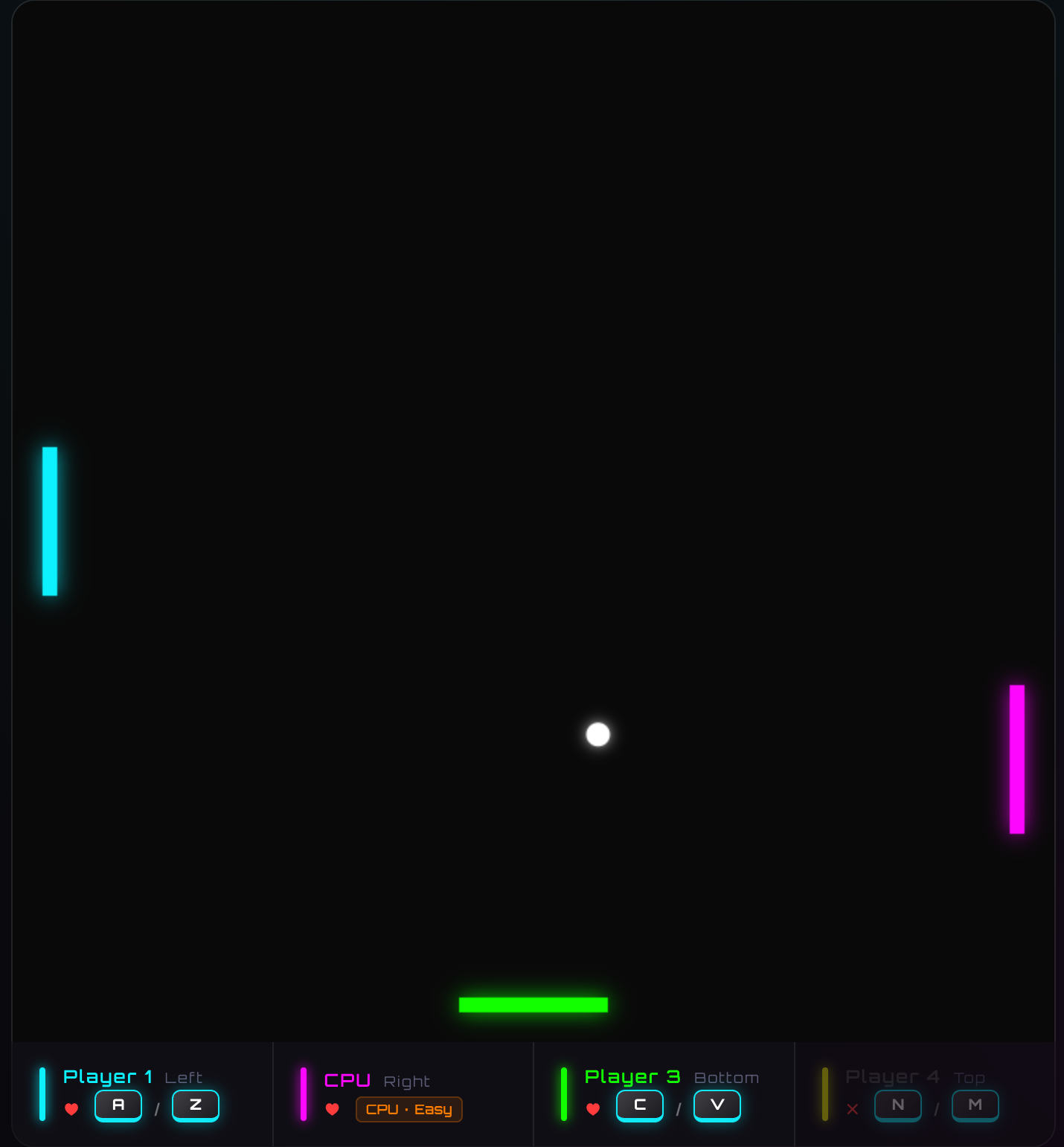
The VibePong game is a simple yet engaging pong-style game where players can compete against each other up to 4 players or against a CPU opponent. The game features various metrics such as ball speed, game duration, and player performance, which are recorded in CSV files for analysis.
Play now :https://jcwinning.github.io/vibepong

game data analysis
In this document, we analyze the game data generated by VibePong. The analysis covers data ingestion, cleaning, and exploratory data analysis (EDA) with visualizations.
Step 1: Read Data
First, we search for all summary and action,telemetry CSV files in the game_data directory and load them into pandas DataFrames.
Show Code
import pandas as pd
import glob
import os

# Load all CSV files from game_data
data_dir = './game_data'
def load_combined(pattern):
    files = glob.glob(os.path.join(data_dir, f'vibepong_{pattern}_*.csv'))
    return pd.concat([pd.read_csv(f) for f in files], ignore_index=True) if files else pd.DataFrame()

df_summary = load_combined('summary')
df_actions = load_combined('actions')
df_telemetry = load_combined('telemetry')

print(f"Loaded {len(df_summary)} summary rows, {len(df_actions)} actions, and {len(df_telemetry)} telemetry records.")
Loaded 75 summary rows, 366 actions, and 658 telemetry records.
game by game data
Show Code
# Display the first few rows of summary data
df_summary.head()
| 0 |
G1770713902861-393 |
2026-02-10T08:58:27.879Z |
5.02 |
CPU |
6.56 |
light |
en |
Player 1 |
0 |
0 |
NaN |
| 1 |
G1770713902861-393 |
2026-02-10T08:58:27.879Z |
5.02 |
CPU |
6.56 |
light |
en |
CPU |
1 |
0 |
NaN |
| 2 |
G1770783544585-550 |
2026-02-11T04:20:01.889Z |
57.30 |
Player 1 |
20.38 |
dark |
en |
Player 1 |
1 |
14 |
NaN |
| 3 |
G1770783544585-550 |
2026-02-11T04:20:01.889Z |
57.30 |
Player 1 |
20.38 |
dark |
en |
CPU |
0 |
14 |
NaN |
| 4 |
G1770713913739-52 |
2026-02-10T08:58:46.511Z |
12.77 |
Player 3 |
7.08 |
light |
en |
Player 1 |
0 |
0 |
NaN |
Play by Play data
Show Code
# Display the first few rows of summary data
df_actions.head()
| 0 |
G1770783544585-550 |
4000 |
System |
Ball served towards CPU |
NaN |
| 1 |
G1770783544585-550 |
4919 |
CPU |
Hit Ball |
NaN |
| 2 |
G1770783544585-550 |
6787 |
Player 1 |
Hit Ball |
NaN |
| 3 |
G1770783544585-550 |
8653 |
CPU |
Hit Ball |
NaN |
| 4 |
G1770783544585-550 |
10519 |
Player 1 |
Hit Ball |
NaN |
time by time data
Show Code
# Display the first few rows of summary data
df_telemetry.head()
| 0 |
G1770793570881-726 |
4011 |
343.50 |
349.77 |
-6.496 |
-0.2292 |
6.5010 |
20.0 |
300.0 |
350.0 |
... |
350.0 |
1.0 |
1.0 |
0.0 |
NaN |
NaN |
NaN |
NaN |
NaN |
NaN |
| 1 |
G1770793570881-726 |
4112 |
304.53 |
348.40 |
-6.496 |
-0.2292 |
6.5073 |
20.0 |
300.0 |
350.0 |
... |
350.0 |
1.0 |
1.0 |
0.0 |
NaN |
NaN |
NaN |
NaN |
NaN |
NaN |
| 2 |
G1770793570881-726 |
4227 |
259.06 |
346.79 |
-6.496 |
-0.2292 |
6.5146 |
20.0 |
300.0 |
350.0 |
... |
350.0 |
1.0 |
1.0 |
0.0 |
NaN |
NaN |
NaN |
NaN |
NaN |
NaN |
| 3 |
G1770793570881-726 |
4328 |
220.08 |
345.42 |
-6.496 |
-0.2292 |
6.5208 |
20.0 |
300.0 |
350.0 |
... |
350.0 |
1.0 |
1.0 |
0.0 |
NaN |
NaN |
NaN |
NaN |
NaN |
NaN |
| 4 |
G1770793570881-726 |
4428 |
181.11 |
344.04 |
-6.496 |
-0.2292 |
6.5271 |
20.0 |
300.0 |
350.0 |
... |
350.0 |
1.0 |
1.0 |
0.0 |
NaN |
NaN |
NaN |
NaN |
NaN |
NaN |
5 rows × 31 columns
Step 2: Data Cleaning
We will clean the data by converting timestamps to datetime objects, handling numeric types, and ensuring consistency.
Show Code
# Clean Summary data
df_summary['Date'] = pd.to_datetime(df_summary['Date'])
numeric_summary = ['Duration (s)', 'Ball Speed', 'Lives', 'Hits']
df_summary[numeric_summary] = df_summary[numeric_summary].apply(pd.to_numeric, errors='coerce')
df_summary = df_summary.dropna(subset=['Player'])

# Clean Action data
df_actions['Timestamp (ms)'] = pd.to_numeric(df_actions['Timestamp (ms)'], errors='coerce')

df_summary.head()
| 0 |
G1770713902861-393 |
2026-02-10 08:58:27.879000+00:00 |
5.02 |
CPU |
6.56 |
light |
en |
Player 1 |
0 |
0 |
NaN |
| 1 |
G1770713902861-393 |
2026-02-10 08:58:27.879000+00:00 |
5.02 |
CPU |
6.56 |
light |
en |
CPU |
1 |
0 |
NaN |
| 2 |
G1770783544585-550 |
2026-02-11 04:20:01.889000+00:00 |
57.30 |
Player 1 |
20.38 |
dark |
en |
Player 1 |
1 |
14 |
NaN |
| 3 |
G1770783544585-550 |
2026-02-11 04:20:01.889000+00:00 |
57.30 |
Player 1 |
20.38 |
dark |
en |
CPU |
0 |
14 |
NaN |
| 4 |
G1770713913739-52 |
2026-02-10 08:58:46.511000+00:00 |
12.77 |
Player 3 |
7.08 |
light |
en |
Player 1 |
0 |
0 |
NaN |
Step 3: EDA and Visualization
Now we’ll look at some key performance indicators and visualize the game results.
Win Distribution
Show Code
import seaborn as sns
import matplotlib.pyplot as plt

# Set aesthetic style
sns.set_theme(style="whitegrid")
plt.rcParams['font.sans-serif'] = ['Arial Unicode MS']
plt.rcParams['axes.unicode_minus'] = False
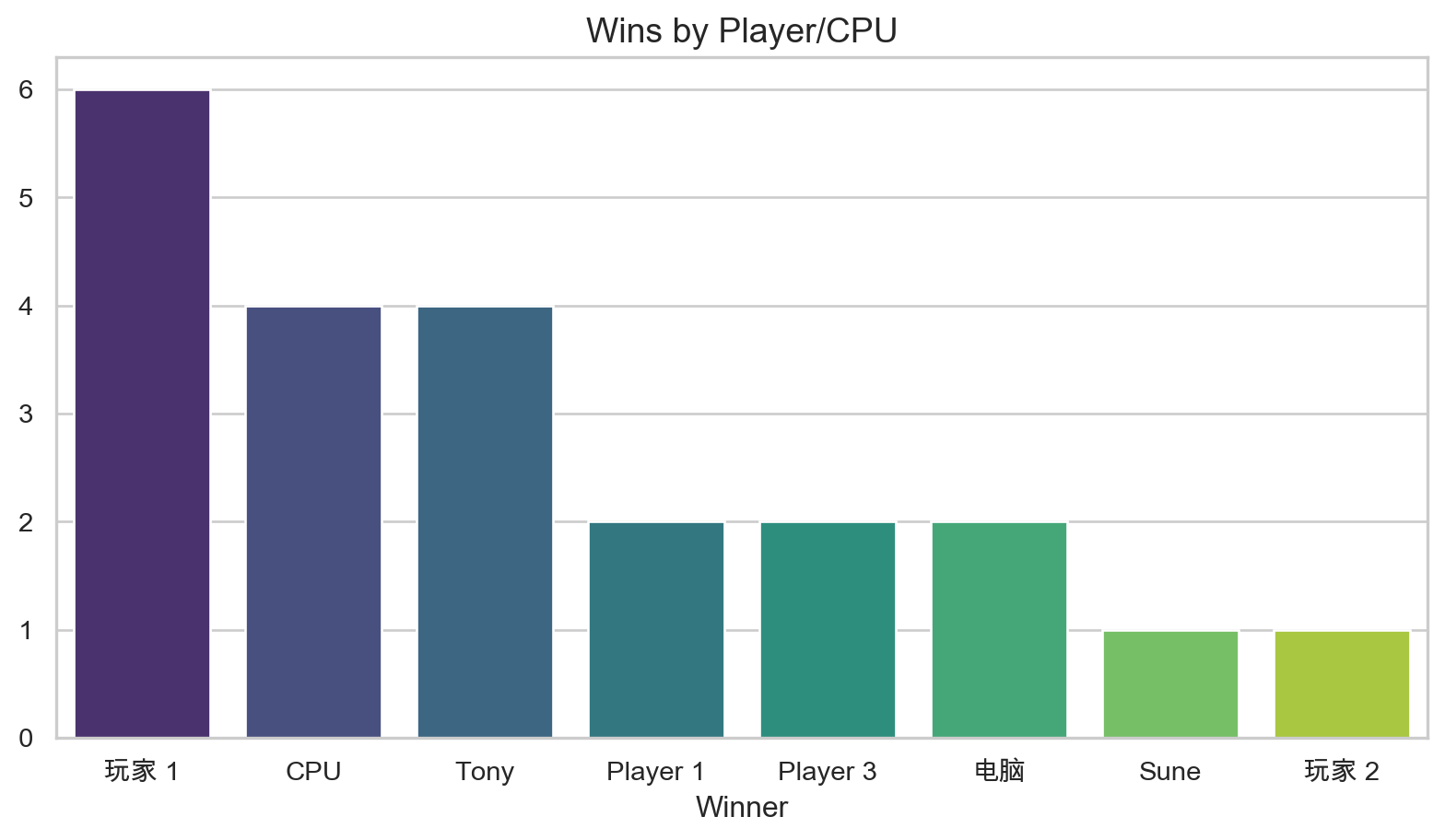
Who is winning the most games?
Show Code
# Count unique games per winner
unique_games = df_summary.drop_duplicates(subset=['Game ID'])
winner_counts = unique_games['Winner'].value_counts()

plt.figure(figsize=(10, 5))
sns.barplot(x=winner_counts.index, y=winner_counts.values, palette="viridis")
plt.title('Wins by Player/CPU', fontsize=14)
plt.show()
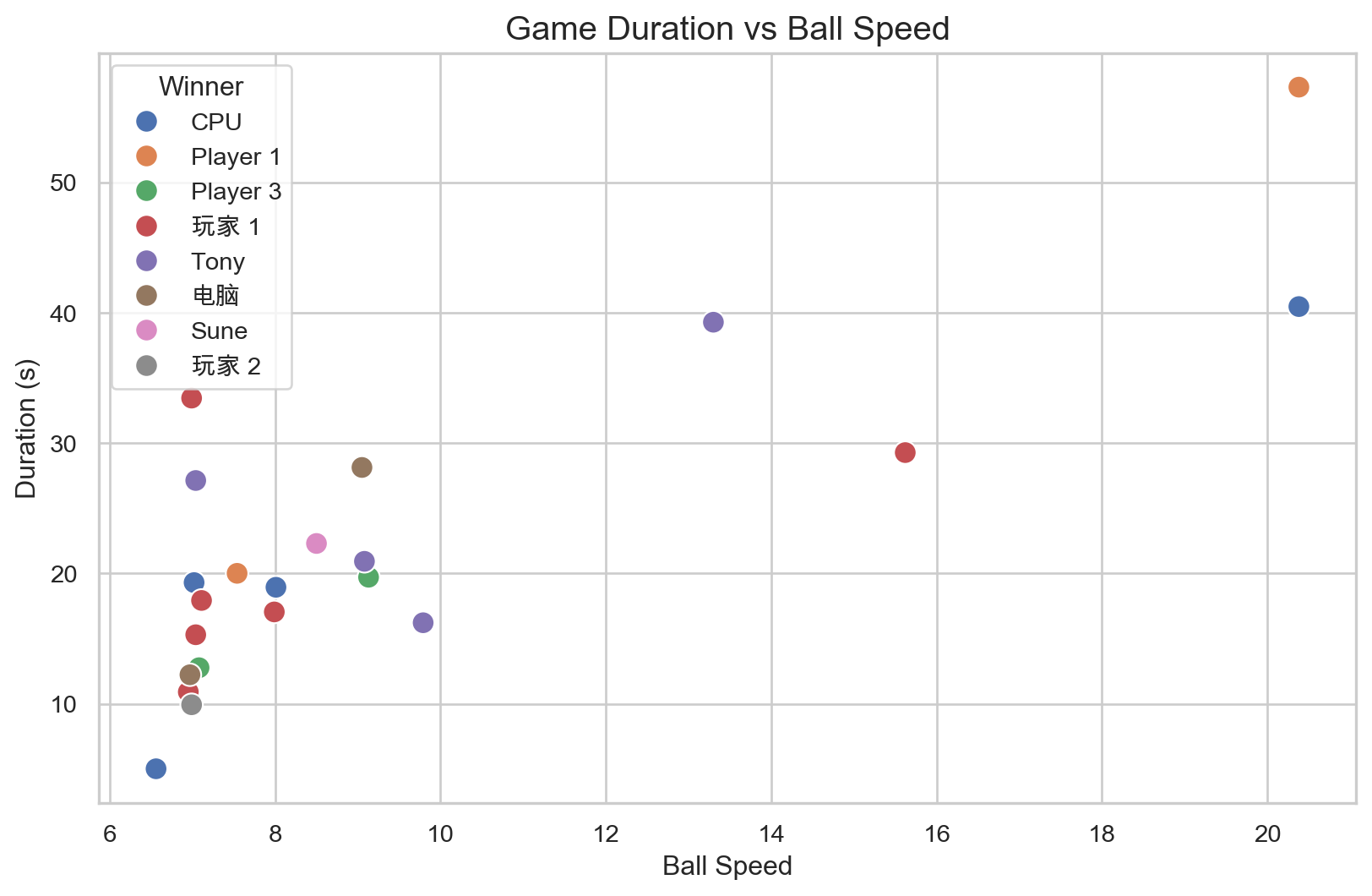
Game Duration vs. Ball Speed
Does a higher ball speed lead to shorter games?
Show Code
plt.figure(figsize=(10, 6))
sns.scatterplot(data=unique_games, x='Ball Speed', y='Duration (s)', hue='Winner', s=100)
plt.title('Game Duration vs Ball Speed', fontsize=15)
plt.show()
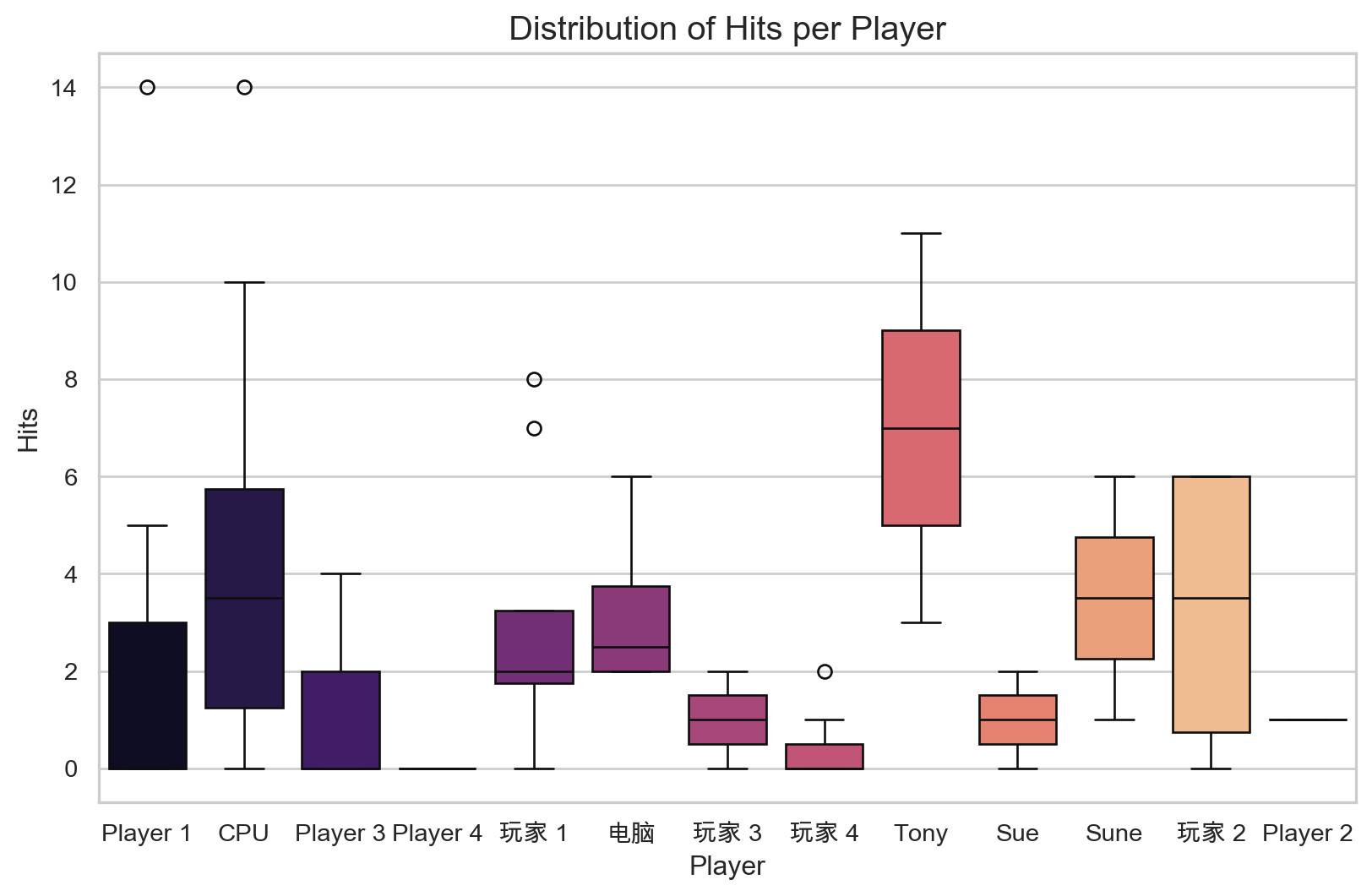
Total Hits per Player
Tracking the skill (hits) across different game sessions.
Show Code
plt.figure(figsize=(10, 6))
sns.boxplot(data=df_summary, x='Player', y='Hits', palette="magma")
plt.title('Distribution of Hits per Player', fontsize=15)
plt.show()
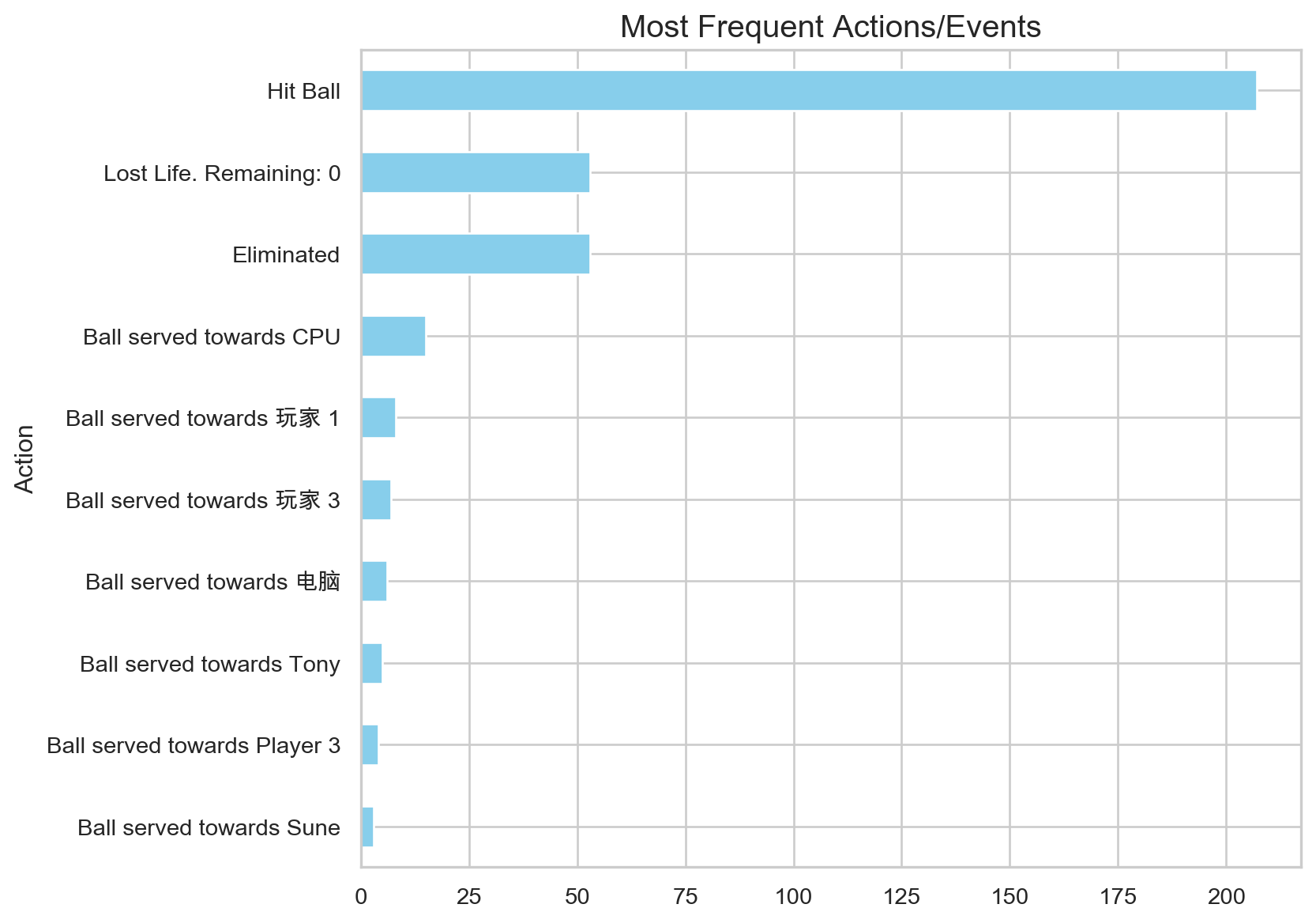
Sequence of Actions
Analyzing the frequency of actions across all games.
Show Code
action_counts = df_actions['Action'].value_counts().head(10)

plt.figure(figsize=(8, 7))
action_counts.plot(kind='barh', color='skyblue')
plt.title('Most Frequent Actions/Events', fontsize=15)
plt.gca().invert_yaxis()
plt.show()
Step 4: Telemetry Data Analysis
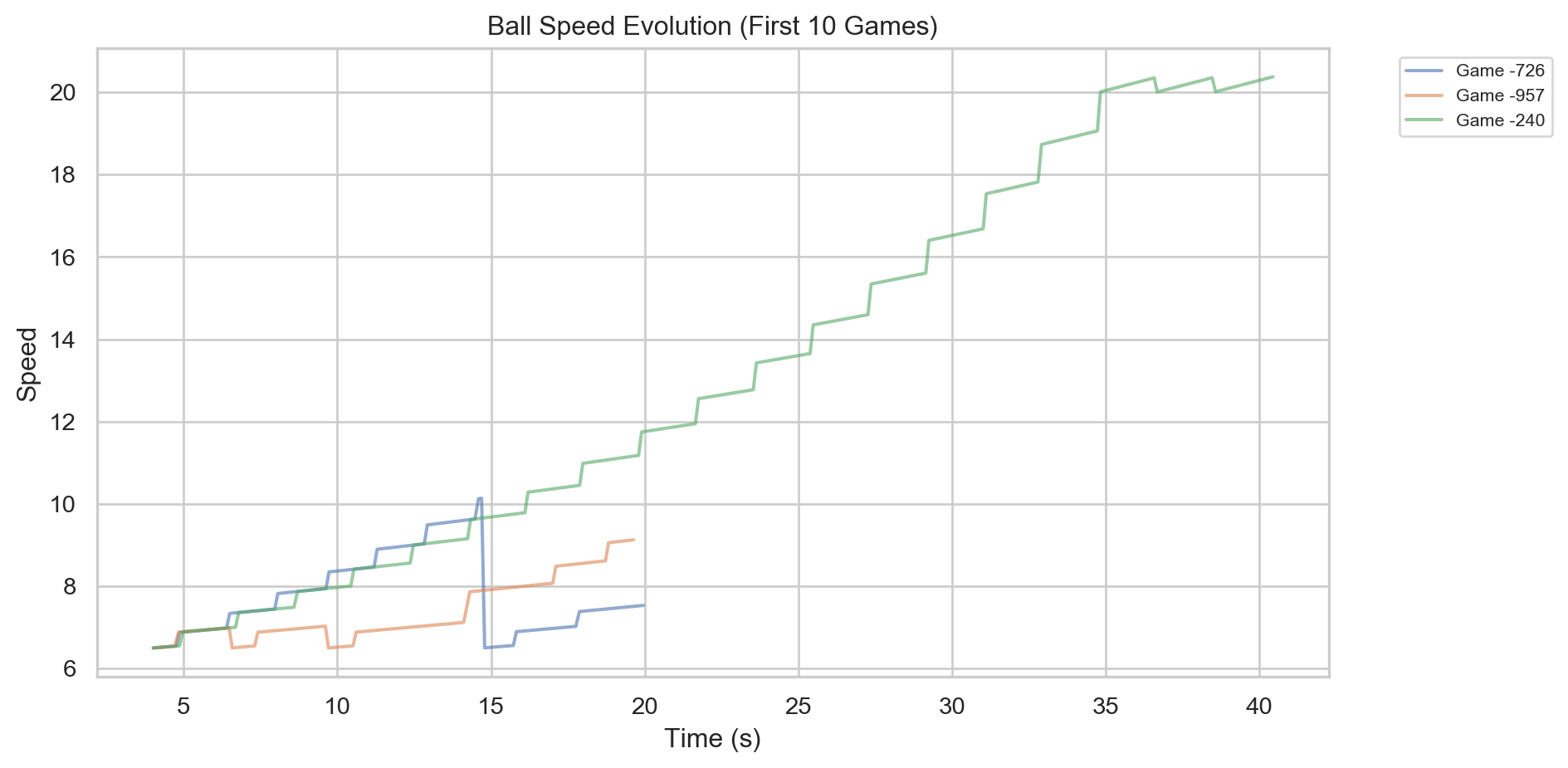
Now let’s analyze the high-frequency telemetry data that captures ball and paddle positions every 100ms.
Ball Speed Over Time
How does ball speed evolve across all games?
Show Code
if not df_telemetry.empty:
    plt.figure(figsize=(10, 5))
    for gid in df_telemetry['Game ID'].unique()[:10]:
        df_g = df_telemetry[df_telemetry['Game ID'] == gid]
        plt.plot(df_g['Timestamp (ms)']/1000, df_g['Ball Speed'], alpha=0.6, label=f'Game {gid[-4:]}')

    plt.title('Ball Speed Evolution (First 10 Games)')
    plt.xlabel('Time (s)')
    plt.ylabel('Speed')
    plt.legend(bbox_to_anchor=(1.05, 1), loc='upper left', fontsize=8)
    plt.tight_layout()
    plt.show()
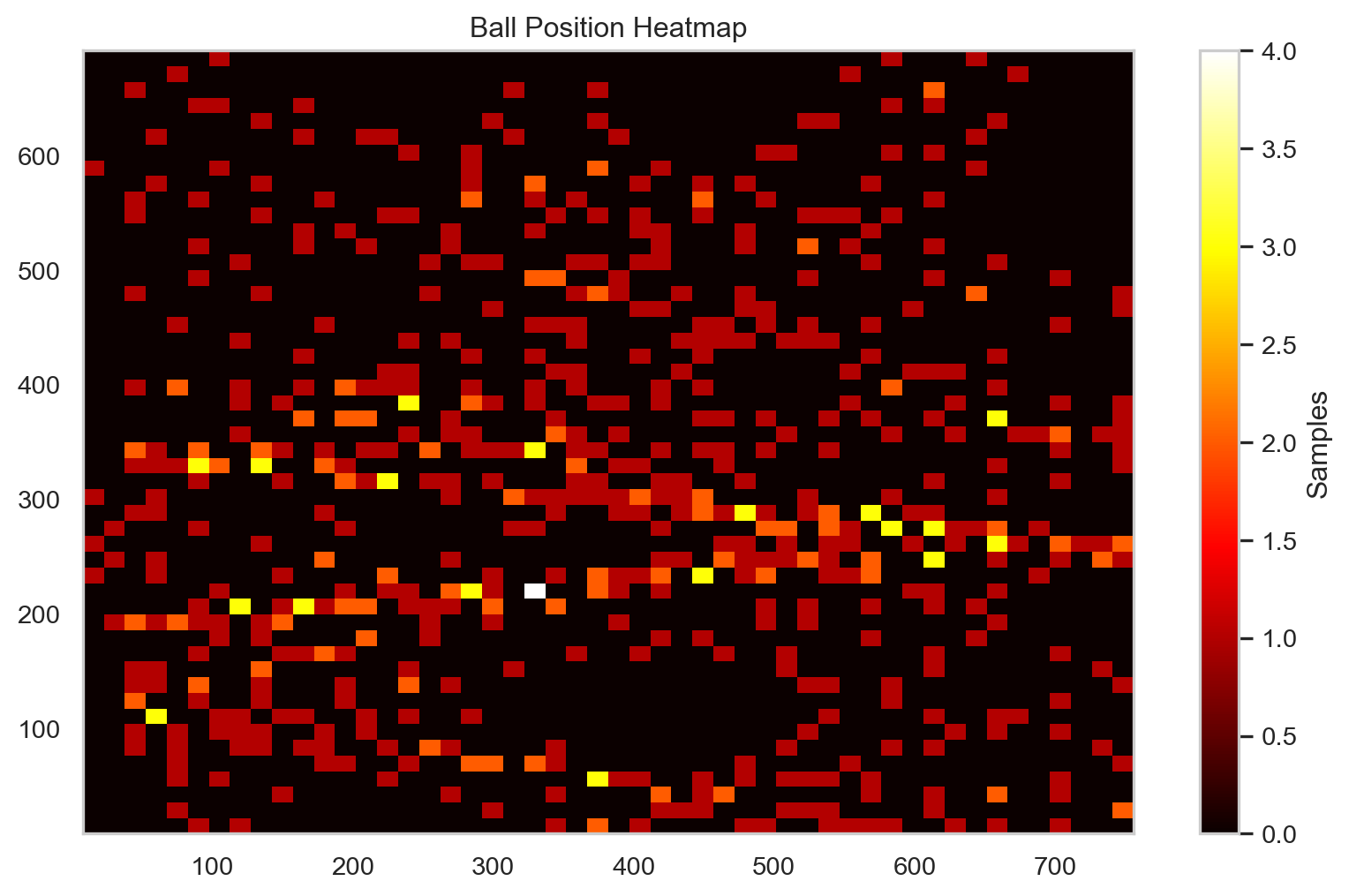
Ball Trajectory Heatmap
Where does the ball spend most of its time on the court?
Show Code
if not df_telemetry.empty:
    plt.figure(figsize=(10, 6))
    plt.hist2d(df_telemetry['Ball X'], df_telemetry['Ball Y'], bins=50, cmap='hot')
    plt.colorbar(label='Samples')
    plt.title('Ball Position Heatmap')
    plt.show()
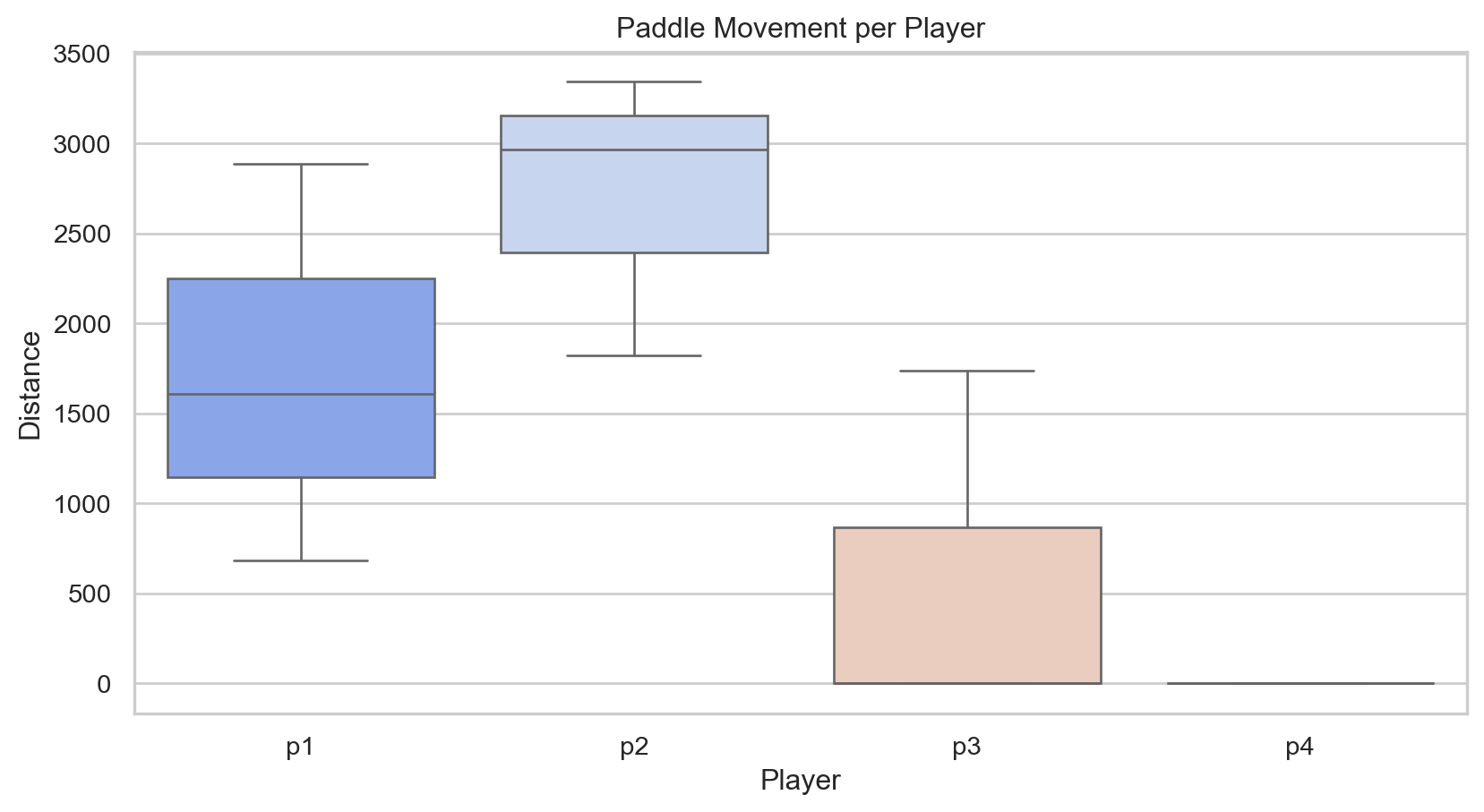
Paddle Movement Analysis
Which players move their paddles the most?
Show Code
if not df_telemetry.empty:
    dist_cols = [c for c in df_telemetry.columns if 'Distance' in c and 'Ball' not in c]
    movement = []
    for gid in df_telemetry['Game ID'].unique():
        df_g = df_telemetry[df_telemetry['Game ID'] == gid]
        for col in dist_cols:
            movement.append({'Player': col.split()[0], 'Distance': df_g[col].sum()})

    plt.figure(figsize=(10, 5))
    sns.boxplot(data=pd.DataFrame(movement), x='Player', y='Distance', palette='coolwarm')
    plt.title('Paddle Movement per Player')
    plt.show()