Powered by AI
  • Home
  • Handbook
    • SQL hangbook
    • R handbook
    • Python handbook
    • Machine learning handbook
    • tensorflowing handbook
    • AI handbook
  • Blog
  • CV / 简历
  • EN/中文
    • English
    • 中文

On this page

  • Key Architectural Shift: Dual-Mode Storage
  • Features
  • Tech Stack
  • Getting Started
    • 1. Installation
    • 2. Environment Configuration
    • 3. Launch
  • Data Mastery
  • Conclusion

Shop Map Manager

AI
API
map
Author

Tony D

Published

November 8, 2025

A robust and elegant personal shop management system. Whether you’re tracking your favorite coffee shops, scenic spots, or planning future visits, this application provides a powerful platform for visualization and data management.

Live Demo(streamlit): https://china-map.streamlit.app (vercel): https://china-mapping.vercel.app/
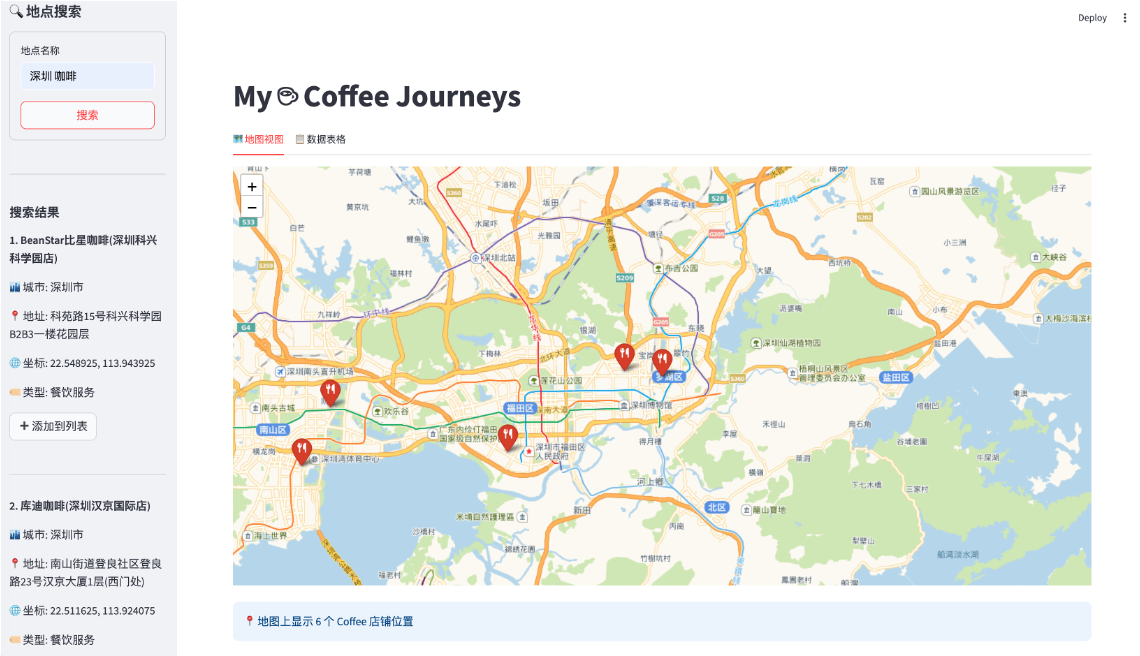
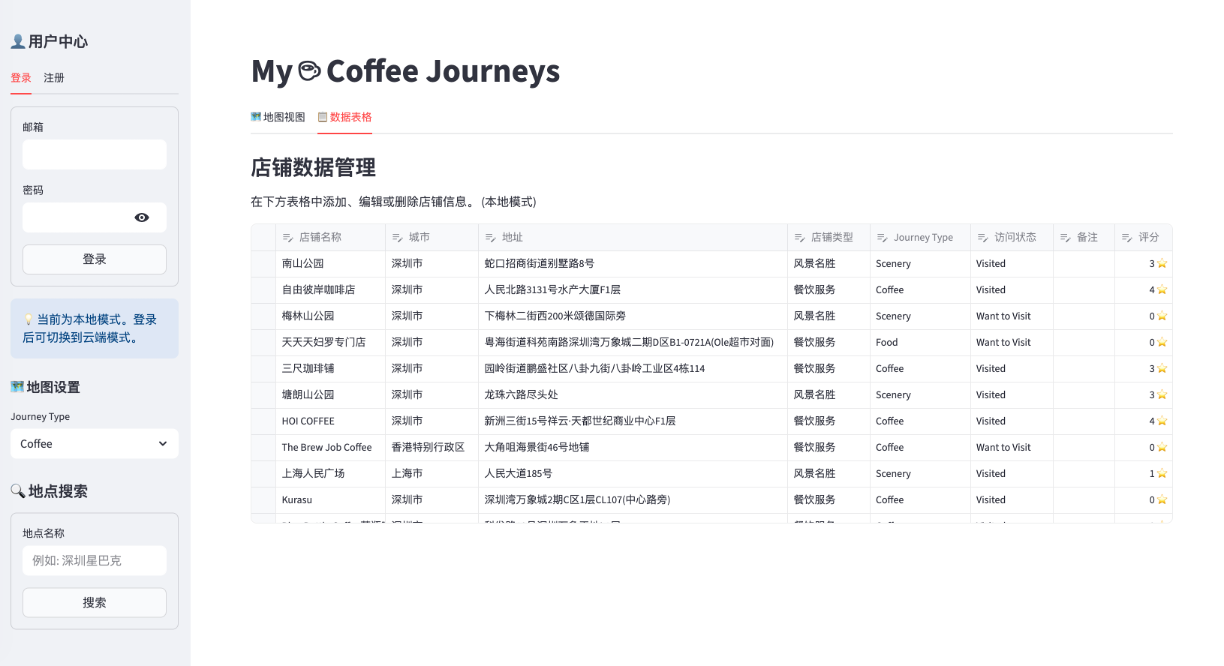
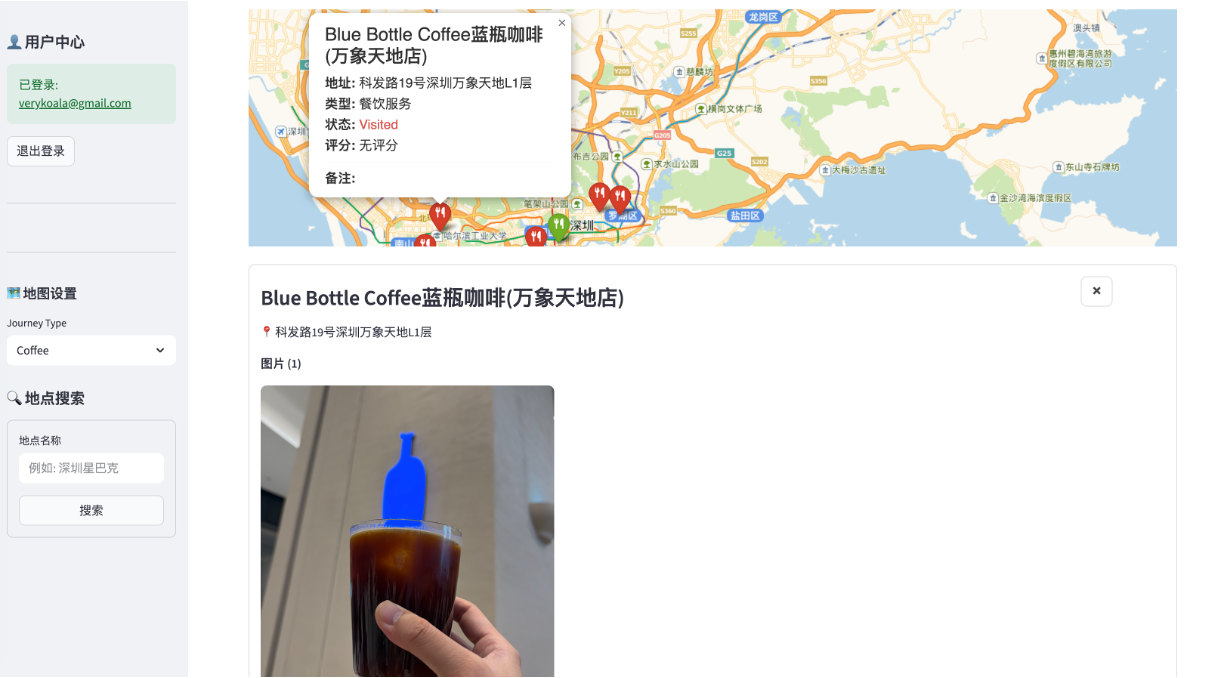
  • Map view
  • Table view
  • shop photo

Key Architectural Shift: Dual-Mode Storage

The most significant update to the project is the introduction of Dual Data Storage Modes, allowing for both privacy and portability:

  • Local Mode: Data is stored securely in a local shops.csv file. Perfect for quick use without any setup.
  • Cloud Mode: Leverages Supabase for real-time synchronization across devices. Your journeys follow you wherever you go.

Features

  • 🔍 Infinite Discovery: Seamlessly integrate with the Gaode (Amap) Map API. Search for any location and add it to your collection with a single click.
  • 🎨 Dynamic Visualization: Interactive maps powered by Folium, featuring:
    • Custom category-specific icons (Coffee, Dining, Scenery, etc.).
    • Intuitive color coding: Red for “Visited”, Green for “Want to Visit”.
  • 📸 Visual Memories: (Cloud Mode) Capture and upload multiple photos for each location, hosted securely on Supabase Storage.
  • ⭐ Deep Insights: Track more than just locations. Store star ratings (1-5), personal notes, and visit timestamps.
  • ⚡ Live Filtering: Instantly filter your view by journey type or visit status to focus on what matters.

Tech Stack

Component Technology
Frontend Streamlit
Mapping Folium
Database/Auth Supabase
API Gaode Maps API
Data Logic Python & Pandas

Getting Started

1. Installation

git clone https://github.com/JCwinning/map_app.git
cd map_app
pip install -r requirements.txt

2. Environment Configuration

Create a .env file in the root directory:

# Essential
GAODE_API_KEY=your_gaode_key

# Optional: For Cloud Mode
SUPABASE_URL=your_supabase_url
SUPABASE_KEY=your_supabase_anon_key

3. Launch

streamlit run app.py

Data Mastery

The application handles complex data structures gracefully, whether stored in a flat CSV or a relational Supabase table:

Column Description
shop_name Name of the location
visit_status Current status (Visited / Want to Visit)
rating Your personal star rating (1-5)
shop_type Category (e.g., Coffee, Retail, Scenery)
images (Cloud Mode) Array of hosted image URLs

Conclusion

The Shop Map Manager has evolved from a simple CSV visualizer into a comprehensive personal travel and discovery companion. By bridging the gap between local simplicity and cloud power, it offers the ultimate flexibility for modern explorers.

Source Code
---
title: "Shop Map Manager"
author: "Tony D"
date: "2025-11-08"
categories: [AI, API, map]
image: "images/0.png"

format:
  html:
    code-fold: true
    code-tools: true
    code-copy: true
    
execute:
  eval: false
  warning: false
---

A robust and elegant personal shop management system. Whether you're tracking your favorite coffee shops, scenic spots, or planning future visits, this application provides a powerful platform for visualization and data management.


Live Demo(streamlit): [https://china-map.streamlit.app](https://china-map.streamlit.app) (vercel): [https://china-mapping.vercel.app/](https://china-mapping.vercel.app/)


::: {.panel-tabset}
 
## Map view
![](images/Picture1.png){width="100%"}


## Table view
![](images/Picture2.png){width="100%"}

## shop photo
![](images/Picture3.png){width="100%"}

:::


## Key Architectural Shift: Dual-Mode Storage

The most significant update to the project is the introduction of **Dual Data Storage Modes**, allowing for both privacy and portability:

-   **Local Mode**: Data is stored securely in a local `shops.csv` file. Perfect for quick use without any setup.
-   **Cloud Mode**: Leverages **Supabase** for real-time synchronization across devices. Your journeys follow you wherever you go.

## Features

-   **🔍 Infinite Discovery**: Seamlessly integrate with the **Gaode (Amap) Map API**. Search for any location and add it to your collection with a single click.
-   **🎨 Dynamic Visualization**: Interactive maps powered by **Folium**, featuring:
    *   Custom category-specific icons (Coffee, Dining, Scenery, etc.).
    *   Intuitive color coding: **Red** for "Visited", **Green** for "Want to Visit".
-   **📸 Visual Memories**: (Cloud Mode) Capture and upload multiple photos for each location, hosted securely on Supabase Storage.
-   **⭐ Deep Insights**: Track more than just locations. Store star ratings (1-5), personal notes, and visit timestamps.
-   **⚡ Live Filtering**: Instantly filter your view by journey type or visit status to focus on what matters.

## Tech Stack

| Component | Technology |
|---|---|
| **Frontend** | [Streamlit](https://streamlit.io/) |
| **Mapping** | [Folium](https://python-visualization.github.io/folium/) |
| **Database/Auth** | [Supabase](https://supabase.com/) |
| **API** | [Gaode Maps API](https://lbs.amap.com/) |
| **Data Logic** | Python & Pandas |

## Getting Started

### 1. Installation

```bash
git clone https://github.com/JCwinning/map_app.git
cd map_app
pip install -r requirements.txt
```

### 2. Environment Configuration

Create a `.env` file in the root directory:

```env
# Essential
GAODE_API_KEY=your_gaode_key

# Optional: For Cloud Mode
SUPABASE_URL=your_supabase_url
SUPABASE_KEY=your_supabase_anon_key
```

### 3. Launch

```bash
streamlit run app.py
```

## Data Mastery

The application handles complex data structures gracefully, whether stored in a flat CSV or a relational Supabase table:

| Column | Description |
|---|---|
| `shop_name` | Name of the location |
| `visit_status` | Current status (Visited / Want to Visit) |
| `rating` | Your personal star rating (1-5) |
| `shop_type` | Category (e.g., Coffee, Retail, Scenery) |
| `images` | (Cloud Mode) Array of hosted image URLs |

---

## Conclusion

The **Shop Map Manager** has evolved from a simple CSV visualizer into a comprehensive personal travel and discovery companion. By bridging the gap between local simplicity and cloud power, it offers the ultimate flexibility for modern explorers.


This blog is built with ❤️ and Quarto.