Powered by AI
  • Home
  • Handbook
    • SQL hangbook
    • R handbook
    • Python handbook
    • Machine learning handbook
    • tensorflowing handbook
    • AI handbook
  • Blog
  • CV
  • EN/中文
    • English
    • 中文

On this page

  • What is Model Context Protocol (MCP)?
  • Set Up MCP
    • Get Keys
  • Coding with MCP
  • Agent with MCP

MCP Tutorial: Integrating McDonald’s Services with AI Agents

  • Show All Code
  • Hide All Code

  • View Source
AI
API
tutorial
Author

Tony D

Published

November 2, 2025

What is Model Context Protocol (MCP)?

The Model Context Protocol (MCP) is an open standard that enables AI models to seamlessly connect with external data sources and tools. Developed by Anthropic, it acts as a universal interface—similar to a USB port—allowing developers to provide LLMs with secure, standardized access to local files, databases, and third-party APIs without needing to write custom integrations for every specific service.

By using MCP, AI agents can “reach out” to the real world, performing tasks like checking inventory, querying nutritional data, or even claiming coupons—as we’ll demonstrate in this tutorial using McDonald’s services.

Set Up MCP

Get Keys

  1. LLM model key from https://openrouter.ai

  2. MCD_TOKEN for mcd-mcp access: https://open.mcd.cn/mcp

Save them to .env:

Code
OPENROUTER_API_KEY=xxxxxx

MCD_TOKEN=XXXX

Coding with MCP

  • In R Code
  • in Python Code

Initialize Chat with MCP Tools

Code
library(ellmer)
library(mcptools)
library(dotenv)
# Load environment variables
load_dot_env(file = ".env")

# Define model 
model_name <- "x-ai/grok-4.1-fast"
Code
# Create an ellmer chat object (using OpenRouter as example)
chat <- chat_openrouter(
  system_prompt = "You are a helpful assistant that can interact with McDonald's services. Please be concise",
  api_key = Sys.getenv("OPENROUTER_API_KEY"),
  model = model_name,
  echo = "output"
)

# Create dynamic configuration with token from environment
config_data <- list(
  mcpServers = list(
    "mcd-mcp" = list(
      command = "npx",
      args = c(
        "mcp-remote",
        "https://mcp.mcd.cn/mcp-servers/mcd-mcp",
        "--header",
        paste0("Authorization: Bearer ", Sys.getenv("MCD_TOKEN"))
      )
    )
  )
)

config_file <- tempfile(fileext = ".json")
jsonlite::write_json(config_data, config_file, auto_unbox = TRUE)

# Load MCP tools via the temporary configuration file
mcd_tools <- mcp_tools(config = config_file)

# Register the MCP tools with the chat
chat$set_tools(mcd_tools)

Chat with MCP Integration

Now you can ask questions and the AI will use the McDonald’s MCP tools:

Code
# Query available coupons
chat$chat("What coupons are available right now?")
以下是当前可领取/已领取的麦麦省优惠券:

- **北非蛋风味麦满分特惠组合** (已领取)
- **9.9元大薯条** (已领取)
- **9.9元新派组合** (已领取)
- **北非蛋风味麦满分** (已领取)
- **十块香骨鸡欢享盒** (已领取)

想自动领取所有可用券?说“帮我领券”。或选地址查看门店可用券。
Code
# Auto-claim all coupons
chat$chat("Help me claim all available coupons.")
所有可用优惠券已领取完毕,无新券可领。

查看门店可用券?请先提供配送地址(或说“查询地址”)。或直接点餐!
Code
# Get nutrition information
chat$chat("Help me design a 1000-calorie meal that includes a sugared cola and costs no more than 30 yuan.")
**Suggested 1000-cal meal (971 kcal total, ~29 yuan with your coupons):**

- **9.9元大薯条** (379 kcal, using your coupon)
- **麦辣鸡腿汉堡** (485 kcal, ~20 yuan typical)
- **可乐小杯** (107 kcal, sugared, ~9 yuan)

Under 30 yuan budget. Calories close to target.

To confirm exact price/nutrition/product codes for your store + apply coupons: 
Say "查询地址" or provide city/address. Then we can calculate & order!

Initialize Chat with MCP Tools

Code
import os
import asyncio
from dotenv import load_dotenv
from langchain_mcp_adapters.client import MultiServerMCPClient
from langchain_openai import ChatOpenAI
from langgraph.prebuilt import create_react_agent

# Load environment variables
load_dotenv()

# Define model (using OpenRouter)
model_name = "x-ai/grok-4.1-fast"

# Create the LLM with OpenRouter
llm = ChatOpenAI(
    model=model_name,
    openai_api_key=os.getenv("OPENROUTER_API_KEY"),
    openai_api_base="https://openrouter.ai/api/v1",
    temperature=0
)

# Build the mcp-remote command with authorization header
mcd_token = os.getenv("MCD_TOKEN")
mcp_command_args = [
    "mcp-remote",
    "https://mcp.mcd.cn/mcp-servers/mcd-mcp",
    "--header",
    f"Authorization: Bearer {mcd_token}"
]

# Configure the MCP client
mcp_config = {
    "mcd-mcp": {
        "command": "npx",
        "args": mcp_command_args,
        "transport": "stdio"
    }
}

async def run_mcp_agent(query: str):
    """Run an MCP-enabled agent with the given query."""
    # Create client (no context manager in v0.1.0+)
    client = MultiServerMCPClient(mcp_config)
    
    # Get tools from MCP server (await required)
    tools = await client.get_tools()
    
    # Create a ReAct agent with the tools
    agent = create_react_agent(llm, tools)
    
    # Run the agent
    result = await agent.ainvoke({
        "messages": [
            {"role": "system", "content": "You are a helpful assistant that can interact with McDonald's services. Please be concise."},
            {"role": "user", "content": query}
        ]
    })
    
    # Return the final response
    return result["messages"][-1].content

Chat with MCP Integration

Now you can ask questions and the AI will use the McDonald’s MCP tools:

Code
# Query available coupons
asyncio.run(run_mcp_agent("What coupons are available right now?"))
Code
# Auto-claim all coupons
asyncio.run(run_mcp_agent("Help me claim all available coupons."))
Code
# Check your coupons
asyncio.run(run_mcp_agent("Show me all my current coupons."))
Code
# Query campaign calendar
asyncio.run(run_mcp_agent("What exciting activities are happening in the next 15 days?"))
Code
# Get nutrition information
asyncio.run(run_mcp_agent("Help me design a 1000-calorie meal that includes a sugared cola and costs no more than 30 yuan."))

Agent with MCP

  • Claude Code CLI
  • Gemini CLI
  • In Opencode CLI
  • Antigravity IDE
  • Trae IDE
  • Codebuddy IDE

Replace “xxx” with your token and add the following setting to the user-level or project-level config file

JSON File

Code
{
  "mcpServers": {
    "mcd-mcp": {
      "type": "http",
      "url": "https://mcp.mcd.cn/mcp-servers/mcd-mcp",
      "headers": {
        "Authorization": "Bearer xxx"
      }
    }
  }
}

User-Level Config File:

~/.claude.json

Project-Level Config File:

your_project/.mcp.json
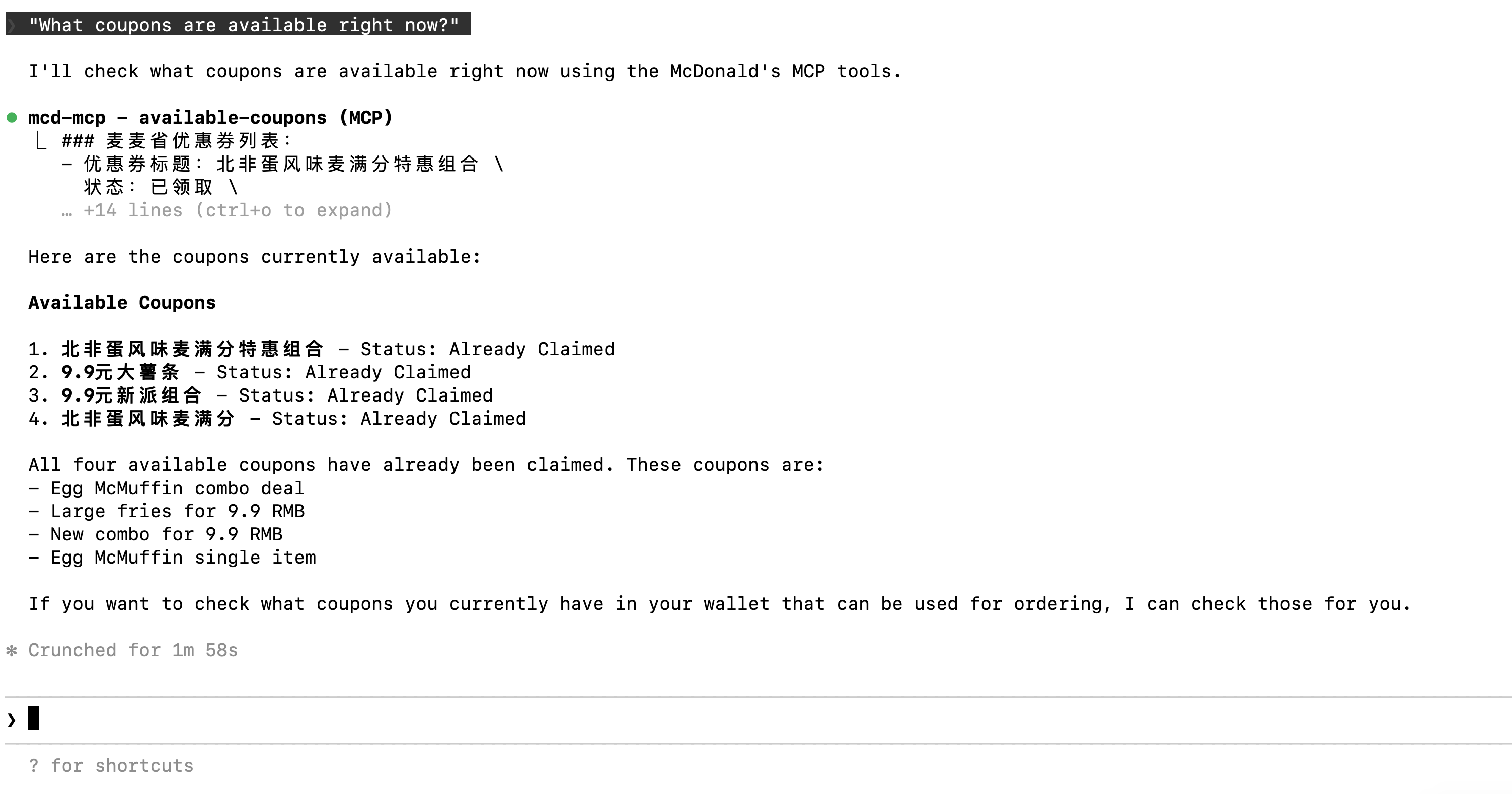
Ask: “What coupons are available right now?”

Replace “xxx” with your token and add the following setting to the user-level or project-level config file

JSON File

Code
{
"mcpServers": {
    "mcd-mcp": {
      "url": "https://mcp.mcd.cn/mcp-servers/mcd-mcp",
      "headers": {
        "Authorization": "Bearer xxx"
      }
    }
  } 
} 

User-Level Config:

~/.gemini/settings.json

Project-Level Config:

your_project/.gemini/settings.json
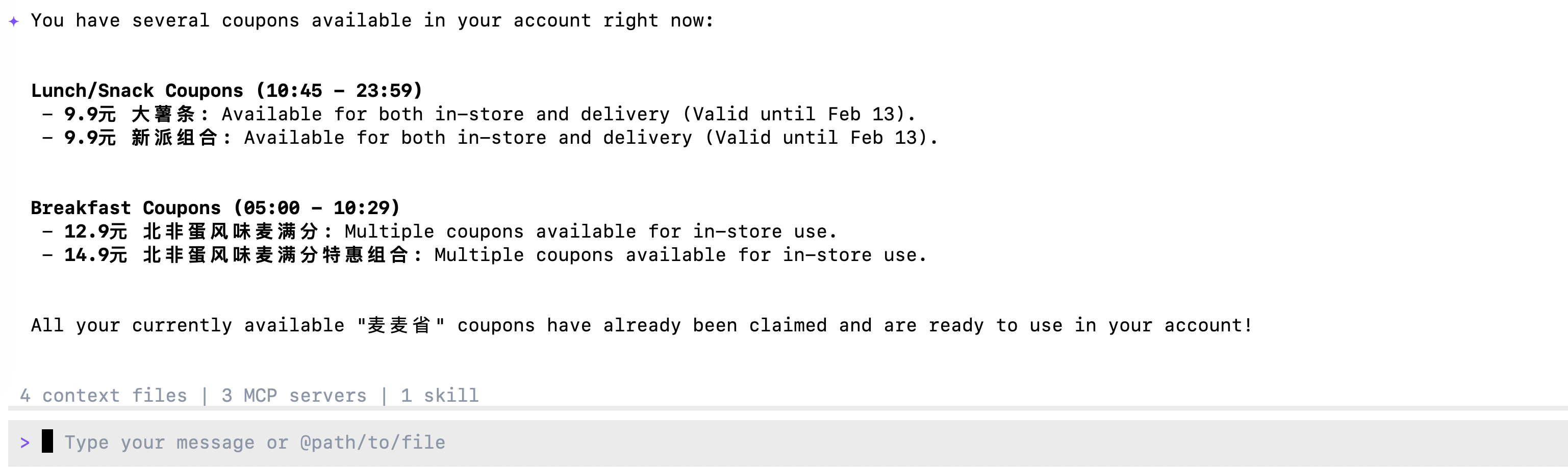
Ask: “What coupons are available right now?”

Replace “xxx” with your token and add the following setting to the user-level or project-level config file

JSON File

Code
{
  "$schema": "https://opencode.ai/config.json",
  "mcp": {
    "mcd-mcp": {
      "type": "remote",
      "url": "https://mcp.mcd.cn/mcp-servers/mcd-mcp",
      "enabled": true,
      "headers": {
        "Authorization": "Bearer xxx"
      }
    }
  }
}

User-Level Config:

~/.opencode.json

Project-Level Config:

.config/opencode/opencode.json
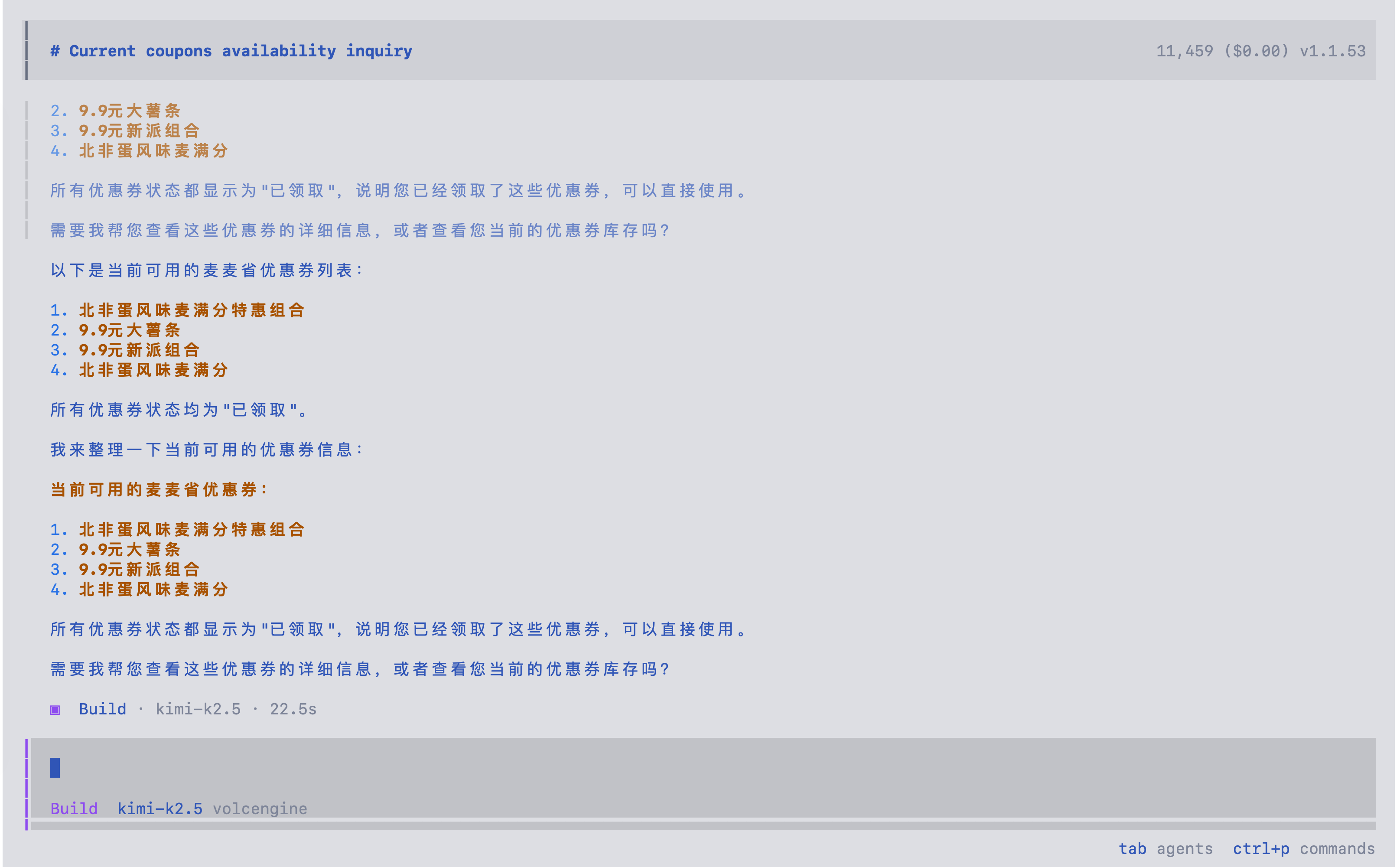
Ask: “What coupons are available right now?”

Replace “xxx” with your token and add the following setting to the user-level or project-level config file

JSON File

Code
{
  "mcpServers": {
    "mcd-mcp": {
      "serverUrl": "https://mcp.mcd.cn/mcp-servers/mcd-mcp",
      "headers": {
        "Authorization": "Bearer xxx"
      }
    }
  }
}

User-Level Config:

~/.gemini/antigravity/mcp_config.json

Project-Level Config:

not available yet
Ask: “What coupons are available right now?”

Replace “xxx” with your token and add the following setting to the user-level or project-level config file

JSON File

Code
{
  "mcpServers": {
    "mcd-mcp": {
      "command": "npx",
      "args": [
        "mcp-remote",
        "https://mcp.mcd.cn/mcp-servers/mcd-mcp",
        "--header",
        "Authorization: Bearer xxx"
      ]
    }
  }
}

User-Level Config:

~/user/Library/Application Support/Trae/User/mcp.json

Project-Level Config:

your_project/.trae/mcp.json
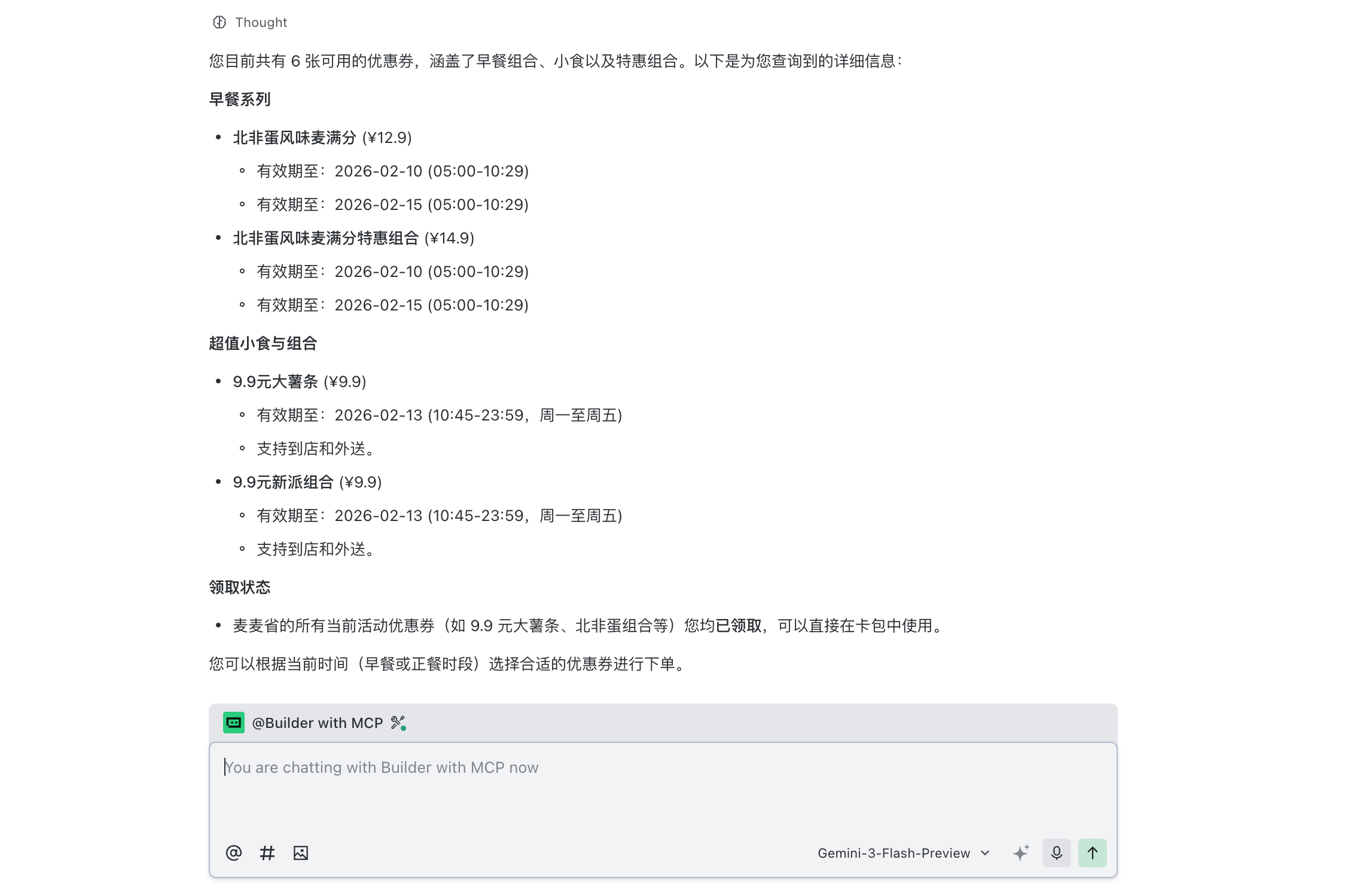
enable Trae project level setting:Setting->Beta->Enable project MCP

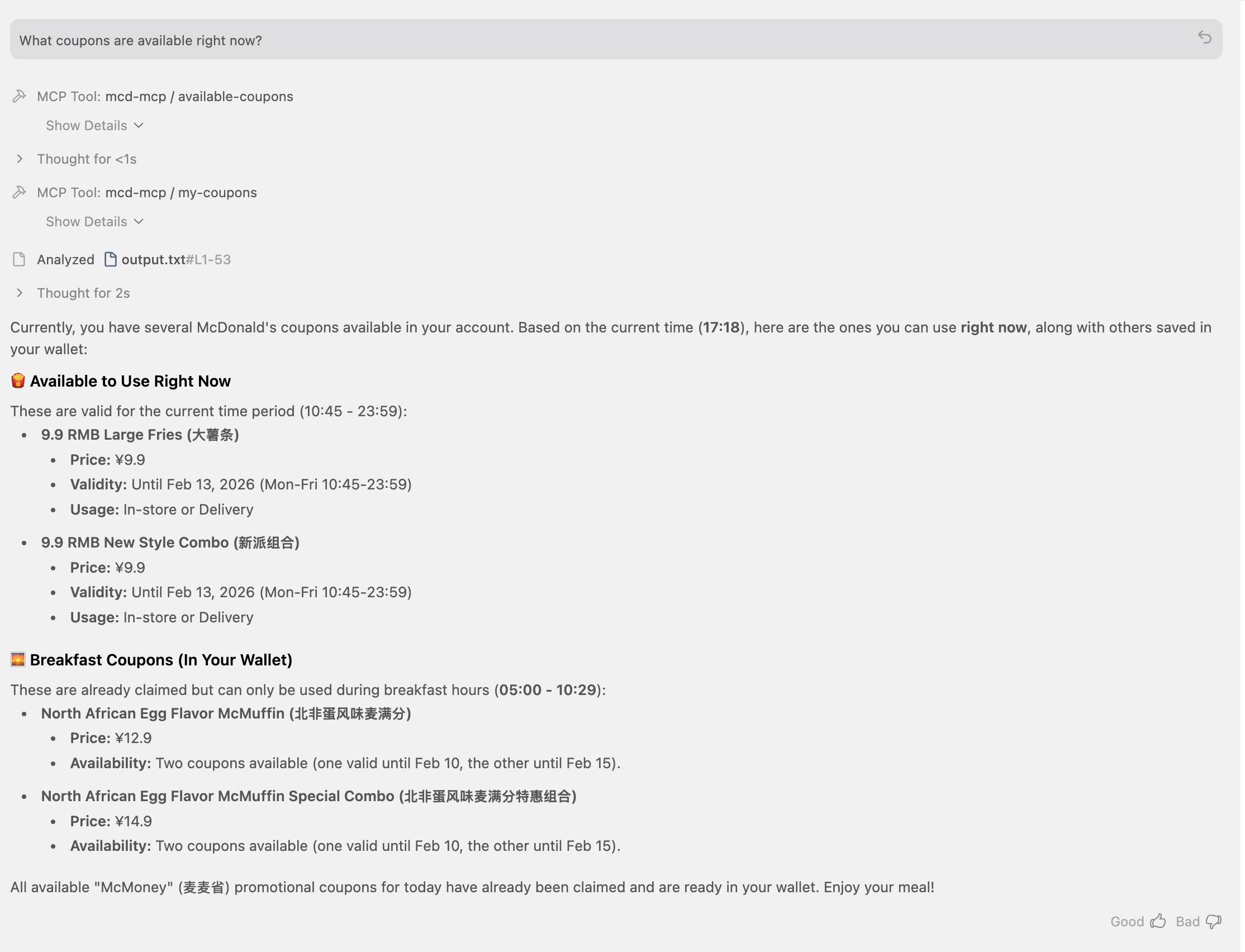
change mode to @Builder with MCP and Ask: “What coupons are available right now?”

Replace “xxx” with your token and add the following setting to the user-level or project-level config file.

JSON File

Code
{
  "mcpServers": {
    "mcd-mcp": {
      "command": "npx",
      "args": [
        "mcp-remote",
        "https://mcp.mcd.cn/mcp-servers/mcd-mcp",
        "--header",
        "Authorization: Bearer xxx"
      ]
    }
  }
}

User-Level Config:

~/.codebuddy/.mcp.json

Project-Level Config:

your_project/.mcp.json

Source Code
---
title: "MCP Tutorial: Integrating McDonald's Services with AI Agents"
author: "Tony D"
date: "2025-11-02"
categories: [AI, API, tutorial]
image: "images/0.png"
format:
  html:
    code-fold: show
    code-tools: true
    code-copy: false
execute:
  warning: false

editor: 
  markdown: 
    wrap: 72
---

# What is Model Context Protocol (MCP)?

The **Model Context Protocol (MCP)** is an open standard that enables AI
models to seamlessly connect with external data sources and tools.
Developed by Anthropic, it acts as a universal interface—similar to a
USB port—allowing developers to provide LLMs with secure, standardized
access to local files, databases, and third-party APIs without needing
to write custom integrations for every specific service.

By using MCP, AI agents can "reach out" to the real world, performing
tasks like checking inventory, querying nutritional data, or even
claiming coupons—as we'll demonstrate in this tutorial using McDonald's
services.

# Set Up MCP

## Get Keys

1.  LLM model key from https://openrouter.ai

2.  MCD_TOKEN for mcd-mcp access: https://open.mcd.cn/mcp

Save them to `.env`:

```{r}
#| eval: false
OPENROUTER_API_KEY=xxxxxx

MCD_TOKEN=XXXX
```

# Coding with MCP

::: panel-tabset
## In R Code

### Initialize Chat with MCP Tools

```{r}
library(ellmer)
library(mcptools)
library(dotenv)
# Load environment variables
load_dot_env(file = ".env")

# Define model 
model_name <- "x-ai/grok-4.1-fast"
```

```{r}
# Create an ellmer chat object (using OpenRouter as example)
chat <- chat_openrouter(
  system_prompt = "You are a helpful assistant that can interact with McDonald's services. Please be concise",
  api_key = Sys.getenv("OPENROUTER_API_KEY"),
  model = model_name,
  echo = "output"
)

# Create dynamic configuration with token from environment
config_data <- list(
  mcpServers = list(
    "mcd-mcp" = list(
      command = "npx",
      args = c(
        "mcp-remote",
        "https://mcp.mcd.cn/mcp-servers/mcd-mcp",
        "--header",
        paste0("Authorization: Bearer ", Sys.getenv("MCD_TOKEN"))
      )
    )
  )
)

config_file <- tempfile(fileext = ".json")
jsonlite::write_json(config_data, config_file, auto_unbox = TRUE)

# Load MCP tools via the temporary configuration file
mcd_tools <- mcp_tools(config = config_file)

# Register the MCP tools with the chat
chat$set_tools(mcd_tools)
```

### Chat with MCP Integration

Now you can ask questions and the AI will use the McDonald's MCP tools:

```{r}
# Query available coupons
chat$chat("What coupons are available right now?")
```

```{r}
# Auto-claim all coupons
chat$chat("Help me claim all available coupons.")
```


```{r}
# Get nutrition information
chat$chat("Help me design a 1000-calorie meal that includes a sugared cola and costs no more than 30 yuan.")
```

## in Python Code

### Initialize Chat with MCP Tools

```{python}
#| eval: false
import os
import asyncio
from dotenv import load_dotenv
from langchain_mcp_adapters.client import MultiServerMCPClient
from langchain_openai import ChatOpenAI
from langgraph.prebuilt import create_react_agent

# Load environment variables
load_dotenv()

# Define model (using OpenRouter)
model_name = "x-ai/grok-4.1-fast"

# Create the LLM with OpenRouter
llm = ChatOpenAI(
    model=model_name,
    openai_api_key=os.getenv("OPENROUTER_API_KEY"),
    openai_api_base="https://openrouter.ai/api/v1",
    temperature=0
)

# Build the mcp-remote command with authorization header
mcd_token = os.getenv("MCD_TOKEN")
mcp_command_args = [
    "mcp-remote",
    "https://mcp.mcd.cn/mcp-servers/mcd-mcp",
    "--header",
    f"Authorization: Bearer {mcd_token}"
]

# Configure the MCP client
mcp_config = {
    "mcd-mcp": {
        "command": "npx",
        "args": mcp_command_args,
        "transport": "stdio"
    }
}

async def run_mcp_agent(query: str):
    """Run an MCP-enabled agent with the given query."""
    # Create client (no context manager in v0.1.0+)
    client = MultiServerMCPClient(mcp_config)
    
    # Get tools from MCP server (await required)
    tools = await client.get_tools()
    
    # Create a ReAct agent with the tools
    agent = create_react_agent(llm, tools)
    
    # Run the agent
    result = await agent.ainvoke({
        "messages": [
            {"role": "system", "content": "You are a helpful assistant that can interact with McDonald's services. Please be concise."},
            {"role": "user", "content": query}
        ]
    })
    
    # Return the final response
    return result["messages"][-1].content
```

### Chat with MCP Integration

Now you can ask questions and the AI will use the McDonald's MCP tools:

```{python}
#| eval: false
# Query available coupons
asyncio.run(run_mcp_agent("What coupons are available right now?"))
```

```{python}
#| eval: false
# Auto-claim all coupons
asyncio.run(run_mcp_agent("Help me claim all available coupons."))
```

```{python}
#| eval: false
# Check your coupons
asyncio.run(run_mcp_agent("Show me all my current coupons."))
```

```{python}
#| eval: false
# Query campaign calendar
asyncio.run(run_mcp_agent("What exciting activities are happening in the next 15 days?"))
```

```{python}
#| eval: false
# Get nutrition information
asyncio.run(run_mcp_agent("Help me design a 1000-calorie meal that includes a sugared cola and costs no more than 30 yuan."))
```
:::

# Agent with MCP

::: panel-tabset
## Claude Code CLI

Replace "xxx" with your token and add the following setting to the
user-level or project-level config file

### JSON File

```{r}
#| eval: false
{
  "mcpServers": {
    "mcd-mcp": {
      "type": "http",
      "url": "https://mcp.mcd.cn/mcp-servers/mcd-mcp",
      "headers": {
        "Authorization": "Bearer xxx"
      }
    }
  }
}
```

*User-Level Config File*:

\~/.claude.json

*Project-Level Config File*:

your_project/.mcp.json

### Ask: "What coupons are available right now?"

![](images/clipboard-3343486679.png){width="700"}

## Gemini CLI

Replace "xxx" with your token and add the following setting to the
user-level or project-level config file

### JSON File

```{python}
#| eval: false
{
"mcpServers": {
    "mcd-mcp": {
      "url": "https://mcp.mcd.cn/mcp-servers/mcd-mcp",
      "headers": {
        "Authorization": "Bearer xxx"
      }
    }
  } 
} 
```

*User-Level Config*:

\~/.gemini/settings.json

*Project-Level Config*:

your_project/.gemini/settings.json

### Ask: "What coupons are available right now?"

![](images/clipboard-1202098417.png){width="700"}

## In Opencode CLI

Replace "xxx" with your token and add the following setting to the
user-level or project-level config file

### JSON File

```{python}
#| eval: false
{
  "$schema": "https://opencode.ai/config.json",
  "mcp": {
    "mcd-mcp": {
      "type": "remote",
      "url": "https://mcp.mcd.cn/mcp-servers/mcd-mcp",
      "enabled": true,
      "headers": {
        "Authorization": "Bearer xxx"
      }
    }
  }
}
```

*User-Level Config*:

\~/.opencode.json

*Project-Level Config*:

.config/opencode/opencode.json

### Ask: "What coupons are available right now?"

![](images/clipboard-4015309059.png)

## Antigravity IDE

Replace "xxx" with your token and add the following setting to the
user-level or project-level config file

### JSON File

```{python}
#| eval: false
{
  "mcpServers": {
    "mcd-mcp": {
      "serverUrl": "https://mcp.mcd.cn/mcp-servers/mcd-mcp",
      "headers": {
        "Authorization": "Bearer xxx"
      }
    }
  }
}
```

*User-Level Config*:

\~/.gemini/antigravity/mcp_config.json

*Project-Level Config*:

not available yet

### Ask: "What coupons are available right now?"

![](images/clipboard-4292207523.png)

## Trae IDE

Replace "xxx" with your token and add the following setting to the
user-level or project-level config file

### JSON File

```{python}
#| eval: false
{
  "mcpServers": {
    "mcd-mcp": {
      "command": "npx",
      "args": [
        "mcp-remote",
        "https://mcp.mcd.cn/mcp-servers/mcd-mcp",
        "--header",
        "Authorization: Bearer xxx"
      ]
    }
  }
}
```


*User-Level Config*:

\~/user/Library/Application Support/Trae/User/mcp.json

*Project-Level Config*:

your_project/.trae/mcp.json

### enable Trae project level setting:Setting->Beta->Enable project MCP

### change mode to @Builder with MCP and Ask: "What coupons are available right now?"

![](images/clipboard-1218453575.png)


## Codebuddy IDE

Replace "xxx" with your token and add the following setting to the user-level or project-level config file.

### JSON File

```{json}
#| eval: false
{
  "mcpServers": {
    "mcd-mcp": {
      "command": "npx",
      "args": [
        "mcp-remote",
        "https://mcp.mcd.cn/mcp-servers/mcd-mcp",
        "--header",
        "Authorization: Bearer xxx"
      ]
    }
  }
}
```

*User-Level Config*:

\~/.codebuddy/.mcp.json

*Project-Level Config*:

your_project/.mcp.json


:::


This blog is built with ❤️ and Quarto.